2019年10月20日日曜日

★★★ 6.7 snapshots


バッテリー残量もでてます


6.7 snapshots の起動風景は以下

説明を追加
今日アジア諸国が欧米と対等に話ができるのは誰のおかげか。
それは自らを殺してまで我々を産んでくれた日本というお母さんがあったからだ。
我々はお母さんが
  お産を決意した12月8日(開戦の日)を、
その後全ての力を出して私たちを産み、
  力尽きた   8月15日(敗戦の日)を
忘れてはならない。


力尽き焦土と化した日本


もしも ナチス 対 「英独米、ソ連」 の白人の内だけの戦争であったなら、 今なお殆どの有色人種国は植民地のままであるかもしれない。

http://truthyouth.jp/2018/522/
ローマ教皇ニコラウス五世にいたっては、ポルトガル人に「異教徒を永遠に奴隷にする許可」を与え、白人キリスト教徒による奴隷狩りに拍車をかけました。

1582年に、日本からヨーロッパに渡った天正少年使節団は次のように報告しています。
「行く先々で日本女性がどこまでいっても沢山目につく。
ヨーロッパ各地で50万という。
肌白くみめよき日本の娘たちが秘所丸出しにつながれ、もてあそばれ、奴隷として転売されていくのを正視できない。
---
ポルトガル人の教会や師父が
硝石と交換し、インドやアフリカまで売っている」


 神は言われた。
 「我々にかたどり、我々に似せて、人を造ろう。そして海の魚、空の鳥、家畜、地の獣、地を這うものすべてを支配させよう。」
 神は御自分にかたどって人を創造された
穿つとかっては 
白人は「神の造った人=白人」と思っていた風がある


snapshots をするのには lumina はちょっと苦しい。
一番 枯れたxfce がいい。


1).xsession
export LANG=ja_JP.UTF-8
export XMODIFIERS="@im=SCIM"
export GTK_IM_MODULE=xim
export QT_IM_MODULE=xim
scim -d
exec ck-launch-session startxfce4


2)autologin
/etc/X11/xenodm/xenodm-config
       DisplayManager.*.autoLogin:   your_user_name


3) pkg_add nano lftp mixfont-mplus-ipa ibus-anthy   cups gutenprint  nautilus  chromium  xfce consolekit2 scim-anthy xfce4-extras


あ) 
fdisk -i -b 1024 sd0


い) 
newfs_msdos sd0i
mount /dev/sd0i /mnt2
mkdir -p /mnt2/efi/boot
cp /mnt/user/mdec/BOOT* /mnt2/efi/boot


ここ以下は以前に書いたもので 今も行けるかは未確認


A)もしopenbsd でwifi router をつくりたいなら

cat id-accesspoint.bat

これは SSIDが aaでパスワードが 123456789で保護されてます。
ifconfig rum0 \
net    192.168.12.1   netmask 255.255.255.0 \
media autoselect mediaopt hostap nwid aa \
wpakey 123456789 chan 1 up


ですね


B)rsync-over-ssh.bat 
rsync -avHx --delete \
--exclude=".cache" \
--exclude=".config" \
--exclude=".local/share/Trash"  \
-e ssh /home/linux/ snap@192.168.0.88:/home/bsd/From-Linux/


C)/etc/rc.local                                       
/etc/rc.d/cupsd start


D) wifiです
/etc/hostname.rum0                                   
nwid elecom2g-b4c2d9
wpakey 123abc
dhcp


E) dhcpd サーバーです
ただし 今の所 イントラネット内で運用中
Linux PC--->bge0:openbsd:run0--->wifi router->router->internet
です。


# ./comment-out.bat /etc/sysctl.conf
net.inet.ip.forwarding=1        # 1=Permit forwarding (routing) of IPv4 packets


# ./comment-out.bat /etc/hostname.bge0                                             
inet 192.168.12.1 255.255.255.0 NONE


# ./comment-out.bat /etc/hostname.run0                                             
nwid elecom2g-b4c2d9
wpakey 12345678
dhcp


# ./comment-out.bat /etc/dhcpd.interfaces
bge0


# ./comment-out.bat /etc/dhcpd.conf                                                 
option  domain-name "my.domain";
option  domain-name-servers 8.8.8.8;
subnet 192.168.12.0 netmask 255.255.255.0 {
        option routers 192.168.12.1;
        range 192.168.12.10 192.168.12.19;
}


# ./comment-out.bat /etc/pf.conf                                                   
ext = "run0"
int = "bge0"
table <martians> { 0.0.0.0/8 10.0.0.0/8 127.0.0.0/8 169.254.0.0/16     \
                   172.16.0.0/12 192.0.0.0/24 192.0.2.0/24 224.0.0.0/3 \
                                 198.18.0.0/15 198.51.100.0/24        \
                   203.0.113.0/24 }
table <spammers> persist file "/etc/spammers"
set block-policy drop
set loginterface egress
set skip on lo0
match in all scrub (no-df random-id max-mss 1440)
match out on egress inet from !(egress:network) to any nat-to (egress:0)
antispoof quick for { egress $ext $int }
block in quick on egress from <martians> to any
block return out quick on egress from any to <martians>
block in quick on egress from <spammers> to any
block return out quick on egress from any to <spammers>
block all
pass out quick inet
block in quick  on { $ext $int }  inet proto tcp from any to any port 5900
pass  in quick  on {      $int }  inet proto tcp from any to any port 22
pass  in  on { $ext $int }  inet

どうも最後の行は
pass  in  on {  $int }  inet
がいいのではと思う昨今


#本来は下の4行、まイントラネット内のDHCPサーバーなので こないしてまんねん
#table <martians> { 0.0.0.0/8 10.0.0.0/8 127.0.0.0/8 169.254.0.0/16     \
#    172.16.0.0/12 192.0.0.0/24 192.0.2.0/24 224.0.0.0/3 \
#    192.168.0.0/16 198.18.0.0/15 198.51.100.0/24        \
#    203.0.113.0/24 }


なお spammerについては、下の 14) をご参照ください。

あるいは 
curl -O http://nami.jp/ipv4bycc/cidr.txt.gz && gunzip -f cidr.txt.gz


```

cp cidr.txt c1

grep CN c1 > s1                               
grep KP c1 > s2

sed 's/CN//' s1 > S1
などで加工して
CN , KP をのけ

awk '{sub(/^[ \t]+/, ""); print}' s1 > spammers.txt-NoSpace

head spammers.txt-NoSpace
1.0.8.0/21
1.1.0.0/24
1.1.16.0/20
1.1.2.0/23
後略

cp spammers.txt-NoSpace /etc/spammers
です


ともかくとして
pfctl -sr 
は                                                                     
match in all scrub (no-df random-id max-mss 1440)
match out on egress inet from ! (egress:network) to any nat-to (egress:0) round-robin
block drop in quick on ! egress inet from 192.168.2.0/24 to any
block drop in quick inet from 192.168.2.113 to any
block drop in quick on ! run0 inet from 192.168.2.0/24 to any
block drop in quick on ! bge0 inet from 192.168.12.0/24 to any
block drop in quick inet from 192.168.12.1 to any
block drop in quick on egress from <martians> to any
block return out quick on egress from any to <martians>
block drop in quick on egress from <spammers> to any
block return out quick on egress from any to <spammers>
block drop all
pass out quick inet all flags S/SA
block drop in quick on run0 inet proto tcp from any to any port = 5900
block drop in quick on bge0 inet proto tcp from any to any port = 5900
pass in quick on bge0 inet proto tcp from any to any port = 22 flags S/SA
pass in on run0 inet all flags S/SA
pass in on bge0 inet all flags S/SA


```


なお pf についてですが
Each time a packet processed by the packet filter comes in on or goes out through an interface, the filter rules are evaluated in sequential order, from first to last.
For block and pass, the last matching rule decides what action is taken;
if no rule matches the packet, the default action is to pass the packet without creating a state.
For match, rules are evaluated every time they match; the pass/block state of a packet remains unchanged.


F) minidlna


./comment-out.bat /etc/minidlna.conf                                   
port=8200
media_dir=/home/userX/share
album_art_names=Cover.jpg/cover.jpg/AlbumArtSmall.jpg/albumartsmall.jpg/AlbumArt.jpg/albumart.jpg/Album.jpg/album.jpg/Folder.jpg/folder.jpg/Thumb.jpg/thumb.jpg
enable_tivo=no
tivo_discovery=bonjour
strict_dlna=no
notify_interval=900
serial=12345678
model_number=1


G)  openbsdをWWW serverとしてつかう(まだ イントラネット内だけですが)
basic認証です


#./comment-out.bat /etc/httpd.conf                                                               
server "default" {
        listen on * port 80
authenticate "secure area" with "/htpasswd.conf"
}


# ls /var/www/htdocs/                                                                             
bgplg      index.html


htpasswd  /var/www/htpasswd.conf auth-user 
Password:
Retype Password:


#  chown www /var/www/htpasswd.conf
# chmod 600 /var/www/htpasswd.conf


/etc/rc.d/httpd -f restart


H) nginxをWWW serverとしてつかう

/etc/nginx/nginx.conf                                                                                   

```
worker_processes  1;
worker_rlimit_nofile 1024;
events {
    worker_connections  800;
}
http {
    include       mime.types;
    default_type  application/octet-stream;
    index         index.html index.htm;
    keepalive_timeout  65;
    server_tokens off;
server {
        listen       80;
        listen       [::]:80;
        server_name  localhost;    #<-for test
        root         /var/www/m1;
auth_basic "Restricted";
auth_basic_user_file /var/www/1/.htpasswd;
          }

server {
        listen       80;
        listen       [::]:80;
        server_name  h.m.jp;
        root         /var/www/m1;
auth_basic "Restricted";
auth_basic_user_file /var/www/1/.htpasswd;
          }

server {
        listen       80;
        listen       [::]:80;
        server_name  s.s.ddns.vc;
        root         /var/www/y2;
auth_basic "Restricted";
auth_basic_user_file /var/www/2/.htpasswd;
          }

server {
        listen       80;
        listen       [::]:80;
        server_name  k.s.ddns.vc;
        root         /var/www/k3;
auth_basic "Restricted";
auth_basic_user_file /var/www/3/.htpasswd;
          }

server {
        listen       80;
        listen       [::]:80;
        server_name  m.p.ddns.vc;
        root         /var/www/d11;
auth_basic "Restricted";
auth_basic_user_file /var/www/11/.htpasswd;
          }

    }


htpasswd thinPC /var/www/1/.htpasswd

chown  www  /var/www/1/.htpasswd


 /etc/pf.conf
ext_if="bge0"
tcp_services="{ 22, 80 }"  # submisson port
icmp_types="echoreq"
set block-policy return
set loginterface $ext_if
set skip on lo
set reassemble yes no-df
block in log
pass out quick
 antispoof quick for { lo  }
pass in  on  $ext_if   inet proto tcp from any to  ( $ext_if:0 ) port  $tcp_services
pass in inet proto icmp all icmp-type $icmp_types
```


I) DVD

dvd+rw-format -force=full  /dev/rcd0c
growisofs -Z /dev/rcd0c -R -J X.iso


J)spammer 
https://www.wizcrafts.net/chinese-blocklist.html
が元です。
spammers.txtが 以下として

```
114.134.184.0/21 1.24.0.0/13 1.48.0.0/15 1.50.0.0/16 1.56.0.0/13 1.68.0.0/14 1.80.0.0/13
以下 略
```

これを 以下にしたら /etc/spammers が得られます。

cat spammers.txt | perl -pe 's/ /\n/g' > /etc/spammers


K) NFS

/etc/exports
/nfs -maproot=bin: -network=192.168.188 -mask=255.255.255.0


/etc/rc.conf.local             
xenodm_flags=
portmap_flags=""
mountd_flags=""
nfsd_flags="-tun 4"


L)DVDを視聴

1) mount /dev/cd0c /mnt
とDVDドライブをマウントします

2)$ mplayer -v /mnt/VIDEO_TS/VTS_11_1.VOB | grep 'audio stream'
==> Found audio stream: 128
==> Found audio stream: 129
にて 音声トラックが2つあることがわかります

3)mplayer /mnt/


L)DVDを視聴VIDEO_TS/VTS_11_1.VOB -aid 129 -nosub
129が日本語で 字幕なしに再生させます


https://ja.wikipedia.org/wiki/%E6%AD%A3%E5%8F%B2 より
正史とは一つの王朝が滅びた後、次代の王朝に仕える人々が著す。
中略
正史とはあくまで「(現)王朝が正当と認めた歴史書」という程の意味であり、
(真の)歴史事実を引き出すには歴史学の手法にのっとり厳密な史料批判を経て行う必要がある.
M) サンバの舞


M) サンバの舞

```
microsoft の windows は、
openbsd , linux などのfree UNIXからの補足されないように
常に そのネットワークシステムを変化させている。
したがって sambaは それにあわせて 猫の目のようにかわらないといけない。
苦労が多いねえ


今やっと
# date ;  /etc/rc.d/samba start ; date
Tue May 14 02:36:22 JST 2019
smbd(ok)
nmbd(ok)
Tue May 14 02:36:48 JST 2019
と 26秒もかかるけど sambaが起動した。


# testparm は                                                                                                                           
rlimit_max: increasing rlimit_max (128) to minimum Windows limit (16384)
Registered MSG_REQ_POOL_USAGE
Registered MSG_REQ_DMALLOC_MARK and LOG_CHANGED
Load smb config files from /etc/samba/smb.conf
rlimit_max: increasing rlimit_max (128) to minimum Windows limit (16384)
Processing section "[homes]"
Processing section "[printers]"
Loaded services file OK.
Server role: ROLE_STANDALONE

Press enter to see a dump of your service definitions

# Global parameters
[global]
        dns proxy = No
        log file = /var/log/samba/smbd.%m
        max log size = 50
        server role = standalone server
        server string = Samba Server
        idmap config * : backend = tdb


[homes]
        browseable = No
        comment = Home Directories
        read only = No


[printers]
        browseable = No
        comment = All Printers
        path = /var/spool/samba
        printable = Yes
だ。


------------
なお
The following new rcscripts were installed: /etc/rc.d/nmbd /etc/rc.d/samba /etc/rc.d/samba_ad_dc /etc/rc.d/saslauthd /etc/rc.d/smbd /etc/rc.d/winbindd
See rcctl(8) for details.
New and changed readme(s):
        /usr/local/share/doc/pkg-readmes/gamin
        /usr/local/share/doc/pkg-readmes/samba
```


N)タブレットでタッチスクリーン

タブレットでタッチスクリーン
vncをつかえば android タブレットが タッチパネルになる。 おー便利


IMG_20190422_102157.jpg
x11vnc -storepasswd

(the last one will use ~/.vnc/passwd)

x11vnc -usepw

( automatically use your ~/.vnc/passwd files)


2019年4月21日日曜日

sed awk

#1 sed 's/CN//' s1 > S1


sed -i 's|/usr/libexec/|/usr/lib/ibus-mozc/|g'


awk '{sub(/^[ \t]+/, ""); print}' s1 > spammers.txt-NoSpace

https://qiita.com/yamazon/items/563af1b485ff413d381f より

#2 echo 1:2/3:4 |awk -F'[:/]' '{print $1,$2}'

dell# ifconfig | grep 192 | awk  '{print $2}'          
192.168.17.17


dell# ifconfig |grep 192 | awk -F'[ ]' '{print $1,$2}'

inet 192.168.17.17


 ./comment-out.bat /etc/samba/smb.conf-ori | ./comment-out.bat- 


comment-out.bat
awk '$1 !~ "#"{print}' $1 | awk 'NF >0 {print}' -

comment-out.bat-

awk '$1 !~ ";"{print}' $1 | awk 'NF >0 {print}' -


  1. sed -> https://qiita.com/mattintosh4/items/4e4d44016be15333af11


2018年6月10日日曜日

clamav : ( only trial , no warrency )

this in my first expiriense with clamav .
so this may include some mistakes ! 

https://wiki.manjaro.org/index.php?title=ClamAV is a very good URL .

キングソフトの無料叛のウイルスの認識率は99.5%です.

巧妙な悪意のあるウイルス開発者は そこなのあたりのアンチウイルスには引っかからないような 新型極悪ウイルスを開発します。
従って免疫でウイルスをやっつけるようなのは 新型ウィルスには感染します。
根本は まず自分の体を鍛え ワクチンなくてもウイルスに感染しない体にしておかないといけないと思います。
この点でも OpenBSD に魅せられてしまいます。


1) in case of openbsd
clamav


/comment-out.bat /etc/freshclam.conf                                          <
DatabaseMirror database.clamav.net

freshclam -v

/comment-out.bat /etc/clamd.conf                                         
LogFile /var/log/clamd.log
LogFileMaxSize 2M
LogRotate yes
LocalSocket /tmp/clamd.socket
User _clamav

MaxRecursion 12


ls -l /var/log/clamd.log
-rw-r--r--  1 _clamav  _clamav  3138 Jun 10 13:56 /var/log/clamd.log


 ./comment-out.bat /etc/rc.local                                           
/etc/rc.d/cupsd restart
/etc/rc.d/freshclam -f restart
/etc/rc.d/clamd -f restart

# ps ax| grep clam  
38003 ??  Is      0:00.02 /usr/local/bin/freshclam -d
31696 ??  Is      0:00.06 /usr/local/sbin/clamd
65693 p0  R+/1    0:00.00 grep clam


curl https://www.eicar.org/download/eicar.com.txt | clamscan - 
  % Total    % Received % Xferd  Average Speed   Time    Time     Time  Current
                                 Dload  Upload   Total   Spent    Left  Speed
100    68  100    68    0     0      8      0  0:00:08  0:00:08 --:--:--    18
stdin: Eicar-Test-Signature FOUND

----------- SCAN SUMMARY -----------
Known viruses: 6543598
Engine version: 0.99.4
Scanned directories: 0
Scanned files: 1
Infected files: 1
Data scanned: 0.00 MB
Data read: 0.00 MB (ratio 0.00:1)
Time: 15.854 sec (0 m 15 s)


clamscan
---------- SCAN SUMMARY -----------
Known viruses: 6543598
Engine version: 0.99.4
Scanned directories: 791
Scanned files: 24016
Infected files: 0
Data scanned: 1342.93 MB
Data read: 20163.23 MB (ratio 0.07:1)
Time: 496.244 sec (8 m 16 s)
bsd# cat /var/log/clamd.log                                                    
+++ Started at Sun Jun 10 13:49:39 2018
Received 0 file descriptor(s) from systemd.
ERROR: Please define server type (local and/or TCP).
+++ Started at Sun Jun 10 13:51:03 2018
Received 0 file descriptor(s) from systemd.
clamd daemon 0.99.4 (OS: openbsd6.3, ARCH: x86_64, CPU: x86_64)
Running as user _clamav (UID 539, GID 539)
Log file size limited to 1048576 bytes.
Reading databases from /var/db/clamav
Not loading PUA signatures.
Bytecode: Security mode set to "TrustSigned".
Loaded 6542959 signatures.
LOCAL: Unix socket file /tmp/clamd.socket
LOCAL: Setting connection queue length to 200
Limits: Global size limit set to 104857600 bytes.
Limits: File size limit set to 26214400 bytes.
Limits: Recursion level limit set to 12.
Limits: Files limit set to 10000.
Limits: MaxEmbeddedPE limit set to 10485760 bytes.
Limits: MaxHTMLNormalize limit set to 10485760 bytes.
Limits: MaxHTMLNoTags limit set to 2097152 bytes.
Limits: MaxScriptNormalize limit set to 5242880 bytes.
Limits: MaxZipTypeRcg limit set to 1048576 bytes.
Limits: MaxPartitions limit set to 50.
Limits: MaxIconsPE limit set to 100.
Limits: MaxRecHWP3 limit set to 16.
Limits: PCREMatchLimit limit set to 10000.
Limits: PCRERecMatchLimit limit set to 5000.
Limits: PCREMaxFileSize limit set to 26214400.
Archive support enabled.
Algorithmic detection enabled.
Portable Executable support enabled.
ELF support enabled.
Mail files support enabled.
OLE2 support enabled.
PDF support enabled.
SWF support enabled.
HTML support enabled.
XMLDOCS support enabled.
HWP3 support enabled.
Self checking every 600 seconds.
Set stacksize to 1048576
--- Stopped at Sun Jun 10 13:53:23 2018
Socket file removed.
+++ Started at Sun Jun 10 13:55:30 2018
Received 0 file descriptor(s) from systemd.
clamd daemon 0.99.4 (OS: openbsd6.3, ARCH: x86_64, CPU: x86_64)
Running as user _clamav (UID 539, GID 539)
Log file size limited to 1048576 bytes.
Reading databases from /var/db/clamav
Not loading PUA signatures.
Bytecode: Security mode set to "TrustSigned".
Loaded 6543598 signatures.
LOCAL: Unix socket file /tmp/clamd.socket
LOCAL: Setting connection queue length to 200
Limits: Global size limit set to 104857600 bytes.
Limits: File size limit set to 26214400 bytes.
Limits: Recursion level limit set to 12.
Limits: Files limit set to 10000.
Limits: MaxEmbeddedPE limit set to 10485760 bytes.
Limits: MaxHTMLNormalize limit set to 10485760 bytes.
Limits: MaxHTMLNoTags limit set to 2097152 bytes.
Limits: MaxScriptNormalize limit set to 5242880 bytes.
Limits: MaxZipTypeRcg limit set to 1048576 bytes.
Limits: MaxPartitions limit set to 50.
Limits: MaxIconsPE limit set to 100.
Limits: MaxRecHWP3 limit set to 16.
Limits: PCREMatchLimit limit set to 10000.
Limits: PCRERecMatchLimit limit set to 5000.
Limits: PCREMaxFileSize limit set to 26214400.
Archive support enabled.
Algorithmic detection enabled.
Portable Executable support enabled.
ELF support enabled.
Mail files support enabled.
OLE2 support enabled.
PDF support enabled.
SWF support enabled.
HTML support enabled.
XMLDOCS support enabled.
HWP3 support enabled.
Self checking every 600 seconds.
Set stacksize to 1048576
SelfCheck: Database status OK.


しかし
24153 _clamav    2    0  565M  528M sleep/3   poll      0:20  0.00% clamd
と clamdは メモリを 528Mも喰ってるので メモリの少ないPCでは 負担だね!


2) in case of archlinux
 clamav-freshclam

clamav-daemon.service

./comment-out.bat /etc/clamav/clamd.conf
LogFile /var/log/clamav/clamd.log
LogTime yes
PidFile /run/clamav/clamd.pid
TemporaryDirectory /tmp
LocalSocket /run/clamav/clamd.ctl
User clamav

touch /run/clamav/clamd.ctl
ls -l /run/clamav/clamd.ctl
srw-rw-rw- 1 clamav clamav 0 Jun 10 14:13 /run/clamav/clamd.ctl


./comment-out.bat /etc/clamav/freshclam.conf
UpdateLogFile /var/log/clamav/freshclam.log
PidFile /run/clamav/freshclam.pid
DatabaseMirror database.clamav.net
NotifyClamd /etc/clamav/clamd.conf


A)https://www.virustotal.com/#/home/upload
で
Analyze suspicious files and URLs to detect types of malware

2018年6月8日金曜日

メインマシンはOpenBSD ( use OpenBSD's X as daily use including print )

2018年5月吉日以来 openbsdをメインマシンとして chromeしてます。
印刷も wifi printerへcupsでできます。
raid 0で使っているので 結構速い。

the next is lumina-dsktop on OpenBSD

1) install  lumina desktop and fcitx-anthy 
https://qiita.com/tyokai/items/8a09dd3e37726f24c4f4


# cat /etc/fstab                                              
/dev/sd1a        /      ffs   rw,wxallowed        1 1
/dev/sd1d        /tmp   ffs   rw,nodev,nosuid     1 2
/dev/sd1b       none    swap  sw

# disklabel sd1 | grep duid

backup by rsync
cat rsync-raid0-2-sas450.bat-sata
dmesg | grep sd | grep MB
echo '---'
mkdir -p /m0a
umount /m0a
mount /dev/sd0a /m0a
mkdir -p /m1a
umount /m1a
mount /dev/sd1a /m1a
echo '---'
df
echo '---'
echo ' rsync -avHx --delete --exclude=".cache" /m0a/ /m1a/  '
echo '---'
read X
echo $X
rsync -avHx --delete --exclude=".cache" /m0a/ /m1a/
df

2) printing 
https://qiita.com/tyokai/items/0cb47bd08cf6ec45de93

3)raid 
https://qiita.com/tyokai/items/f496449a863c4ac05ef0


4)growfs
https://qiita.com/tyokai/items/ead7a5b4b176cd3ef5a0


5) clone to smaller hard disk
        (  * kernel may be changed *)

http://openbsd-akita.blogspot.com/2018/04/cloning-to-smaller-hard-disk.html


6)sound & screensaver
 pkg_add pavucontrol-3.0p3-gtk3


7) clamav no warrency 
http://openbsd-akita.blogspot.com/2018/06/clamav-only-trial-no-warrency.html


8) samba
https://qiita.com/tyokai/items/14809f4f8a5000b5e6ac


A) how to connect wifi router
      A-1)  USB wifi works sometimes
                       by urtwn-firmware-1.2.tgz on firmware.openbsd.org


これ不安定で snapshots でしか動かない模様
また
PCにも依存。
そのため確実に動かすなら次ですね。
なお snapshots のあつかいは
https://qiita.com/tyokai/items/3ecac312e797cc6cf058


     A-2)  small wifi repeater (4.5 X 4.5 X 1.5cm)


9) use a server machine as daily use
   ( X , audio ) 
https://qiita.com/tyokai/items/f496449a863c4ac05ef0


あ) なるほど 正確なコーディングをモットーとするOpenBSDは 動けばOKというLINUXより遅い。
が セキュアだ。
chromeなどのアプリ レベルまでは OpenBSDは保証してない。
セキュリテイ範囲は OpenBSD謹製の
この範囲内だ。
旅客機は速さより 安全性を求められる。
コンコルドの悲劇を思い出そう。


い) 数学を統一を志向するラングランズ・プログラムは
数学と物理学の驚異のつながりを指摘している。
これらには
美しい対称性がある。
OpenBSDにもこの美しさがあり 魅せられてしまう。

なお 数学は 理論物理における言葉であり
また 数学で証明されたことには 神さえも反論できない。
例えば 神も 任意の角度を 定規とコンパスだけでは3等分できない。
でも 別法でパット3等分してしまう。

いわゆる言葉は動物でも使うが、 中学以上の数学は猿には無理だ。


う)神の数式


新約聖書にある、
「はじめに言葉があった、言葉は神と共にあった、言葉は神であった」

「数式は神とともにあった、数式は神であった」


youtubeにあります。
とくに 第1、4回 が素晴らしい。
自分のまとめは以下です。
 物質は五つの物質で成り立ってます 
一つは電子でこれは電磁気力です 
それから二つは アッパークォークとダウンクォークで この二つは強い力の影響をうけます 
それからニュートリノでこれは弱い力です 
最後が ヒッグス粒子で これは式はあるんだけど何の力かよくわかりませんでした

極小の世界を あつかう素粒子物理学 と
宇宙という極大の世界を探る 相対性理論 
があって、
従来はこの二つを無理やり統一しようとして 無限大の問題が出て挫折でした。

これは 素粒子を 点と考えることから生じたものであった。
それで ひも理論が出てきました 
ひも理論では素粒子は点ではなく ある大きさを持った 紐ととらえます。


この理論の素晴らしいところはひも理論を 数学的に展開すると
ここから次の二つのものが導かれることです 
一つは 素粒子の理論 (標準理論)で
それと同時に

相対性理論がです。
瓢箪から コマが2つでてきました。

将棋でも読む力(将棋に展開する数学力)がないと 勝てない。


2018年4月23日月曜日

cloning to smaller hard disk

i want to clone bigger HDD(sd1) to smaller HDD(sd0) 


1) boot pc by USB stick ( indtall53.fs)
2)chose install


3) acertain disks by !
4) exit


5) which disk is the root dik ? ---> sd0 


then formatting sd0


6)which disk do you want to initialize? --->sd1
   then
   controll + c 


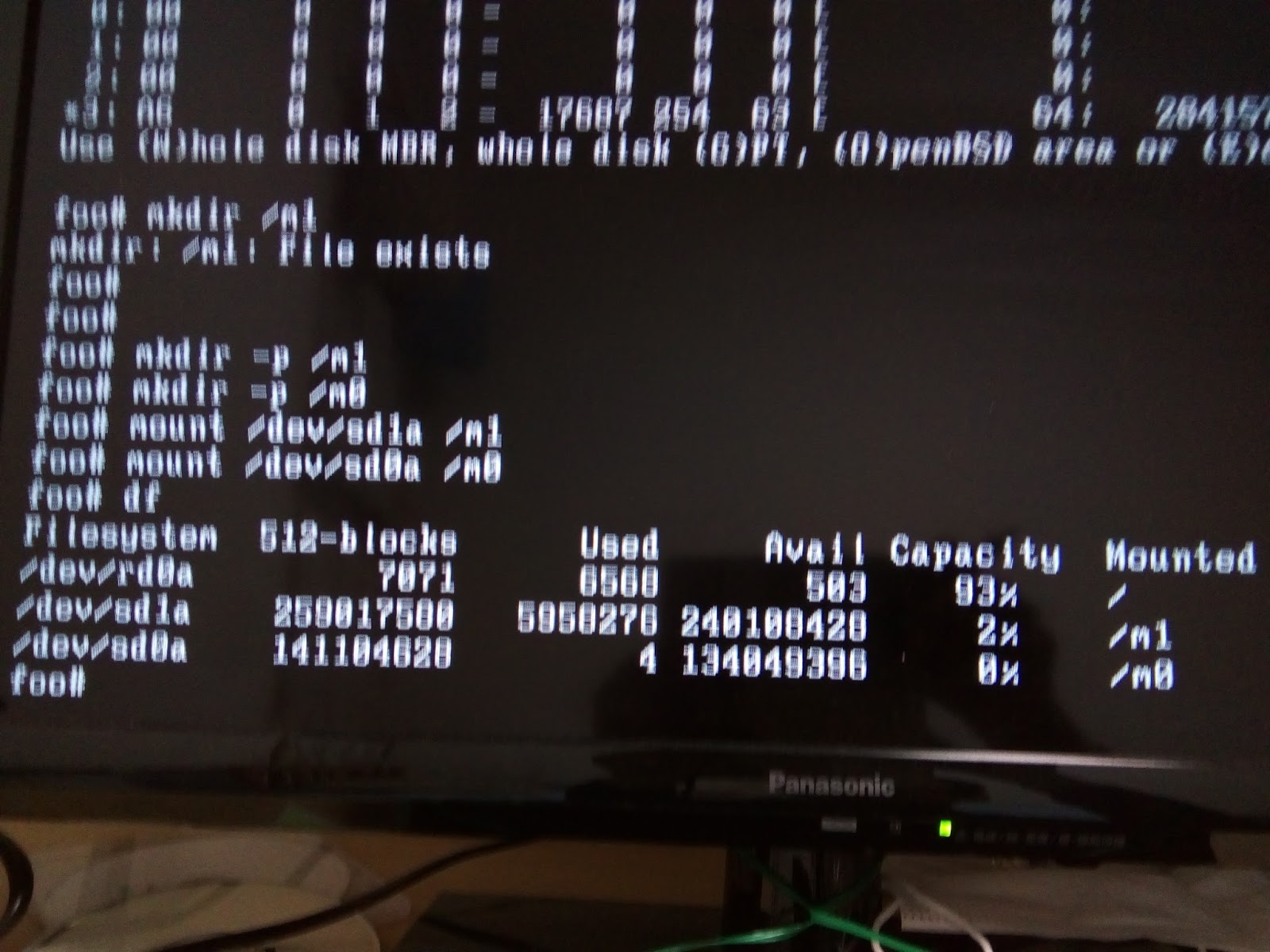
7)mkdir -p /m1
   mkdir -p /m2
   mount /dev/sd1a /m1
   mount /dev/sd0a /m0


8) (cd m1 ; tar cvpf - .)|( cd /m0 ; tar xpf -) 

10) halt -p 
11) remove bigger HDD (namely smaller HDD only inserted)
12 ) reboot and then choose upgrade


13)mkdir /m0
     mount /dev/sd0a /m0


14) echo '/dev/sd0a / ffs rw,wxallowed 1 1' > /m0/etc/fstab


 at present namely , 10 days later
i think that
 In advance the fstab of the bigger hard disk
should be  /dev/sd0a / ffs rw,wxallowed 1 1  
this setting is more convinient 


15) then do upgrade again


all is done


but
this method require 2 times of USB memory booting .

so i write down only 1 time USB memory booting method on
https://qiita.com/tyokai/items/2aaac13642599b09dd68 

but 
both methods may change kernel by upgrade ,
in thi point growfs is superior . 
so they are  most usable at virsion grade up .


2018年4月19日木曜日

growfs (revision 18/05/03)


in order to know the true fact ,


both 
the master of the languages of that past 
and
the technique of the archaeology .

the politicians lack both of them.
so 
the politicians say often the fake history !
we should not learn  the cooking of the susi  from the politicians !


is  me  , fake fake fake !


i write down here that 
if you use both dd and growfs(6.3) ,
you can clone small hard disk drive to bigger one !

archlinux で openbsdをいれた
HDD1(80GB)を 
より大きな容量のHDD2(160GB)
へddしておきます。
dd if=/dev/sdS of=/dev/sdB bs=32k

なお openbsdでは 
a は  /  
in order to simplify ,  /etc/fstab is
5e6829d8a4741b1.a / ffs rw,wxallowed 1 1


このあとHDD2をつけ 電源をいれます。


boot bsd.rd で起動します


shell


fdisk -e sd0

here 、286749480-4=286749476 


disklabel -E sd0
b -> * -> c -> a


fsck -> growfs


fsck again


reboot is OK !
I'am so happy .