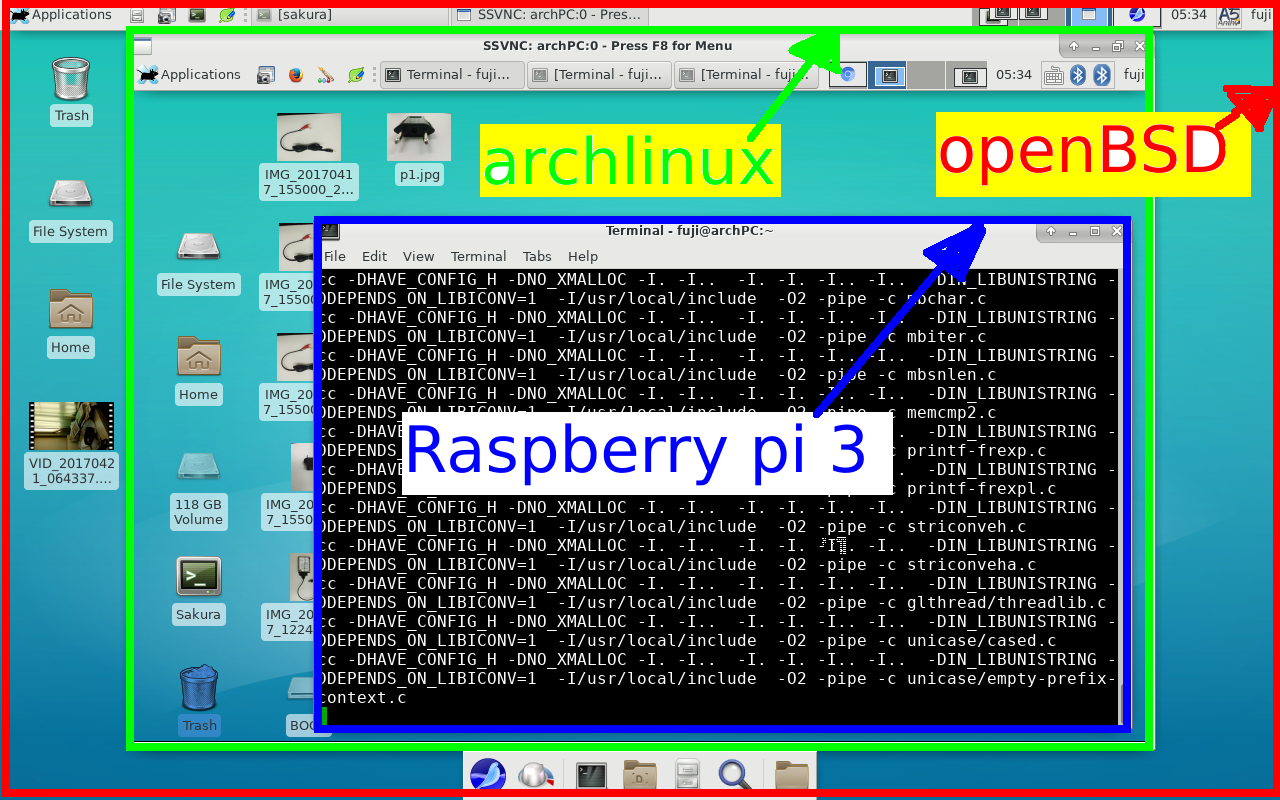
fake history made by politicians
Politicians cannot do olympic level figure skating .Politicians do not have the technology to explore history .
Therefore history should be left to historians.
Conversely, historians should not do politics at present .

Regarding the historical problems
lying between the two countries,
I think that it should be decided openly
by discussions with two national academics .
某国に行ってそこの屋台を食べた
確かに美味しい
しかし衛生と言う概念がまるでない
生野菜はそこのあたりの水で洗っているので食べたら細菌性の下痢の心配がある・
油はドブに捨てた油から作られてるかもしれない。

windows にはこの衛生概念違ったセキュリティへの配慮がかけている。
あなたは美味しいけど危険な windows を食べ続けますか。
あるいは
コードの正確さから生まれるセキュリティなopenbsdにのりかえますか
旅客機にとって一番大事なことは安全に飛ぶことです

といいながら
白河の 清きに魚も 住みかねて もとの濁りの 田沼恋しき
ということで中庸なLINUXを常用してる日和見な自分がいる
これが現実だね(ちょっと言われてその気になって、女房にしたのがおおまちがい。
USB wifi ,bluetooth まるでダメ。 RUM0はOKだったけどねー )


と いうふうに日本語入力 OKです。
今回の壁は xenodm でした。
ビデオは ここ
寄り道への誘惑 openbsdとUEFIは ここ
1) .profile
export PKG_PATH=ftp://ftp.jaist.ac.jp/pub/OpenBSD/6.1/packages/i386
2)pkg_add nano lftp xfce
3)cat .xsession
startxfce4
4)cat /etc/rc.conf.local
xenodm_flags=
にて xfce4が始まる
for autologin
by https://marc.info/?l=openbsd-misc&m=149261350115837&w=2
Just add to /etc/X11/xenodm/xenodm-config
DisplayManager.*.autoLogin: your_user_name
5)pkg_add chromium seamonkey seamonkey-i18n-ja
chromeは パッケージからでも ポートからやっても立ち上がらないね
chromeは パッケージからでも ポートからやっても立ち上がらないね
6)pkg_add ibus-anthy ja-mplus-ttf
cat .profile
# $OpenBSD: dot.profile,v 1.4 2005/02/16 06:56:57 matthieu Exp $
#
# sh/ksh initialization
PATH=$HOME/bin:/bin:/sbin:/usr/bin:/usr/sbin:/usr/X11R6/bin:/usr/local/bin:/usr/local/sbin:/usr/games:.
export PATH HOME TERM
export PKG_PATH=ftp://ftp.jaist.ac.jp/pub/OpenBSD/6.1/packages/i386
export XMODIFIERS=@im=ibus
export GTK_IM_MODULE="ibus"
export QT_IM_MODULE="ibus"
7)pkg_add xfce4-screenshooter
pkg_add sakura
pkg_add xfce4-mixer
# ./comment-out.bat /etc/rc.local
if [ -x /usr/local/bin/slim ]; then
echo -n ' slim'; ( sleep 5; /usr/local/bin/slim -nodaemon ) &
fi
if [ -x /usr/local/bin/slim ]; then
echo -n ' slim'; ( sleep 5; /usr/local/bin/slim -nodaemon ) &
fi
8)boot openbsd by grub
fdisk -l /dev/sda
Device Boot Start End Sectors Size Id Type
/dev/sda1 4196352 61499391 57303040 27.3G 83 Linux
/dev/sda2 2048 4196351 4194304 2G 82 Linux swap / Solaris
/dev/sda4 61499392 156301487 94802096 45.2G a6 OpenBSD
/boot/grub/grub.cfg
insmod part_gpt
insmod part_msdos
if [ -s $prefix/grubenv ]; then
load_env
fi
if [ "${next_entry}" ] ; then
set default="${next_entry}"
set next_entry=
save_env next_entry
set boot_once=true
else
set default="0"
fi
if [ x"${feature_menuentry_id}" = xy ]; then
menuentry_id_option="--id"
else
menuentry_id_option=""
fi
export menuentry_id_option
if [ "${prev_saved_entry}" ]; then
set saved_entry="${prev_saved_entry}"
save_env saved_entry
set prev_saved_entry=
save_env prev_saved_entry
set boot_once=true
fi
function savedefault {
if [ -z "${boot_once}" ]; then
saved_entry="${chosen}"
save_env saved_entry
fi
}
function load_video {
if [ x$feature_all_video_module = xy ]; then
insmod all_video
else
insmod efi_gop
insmod efi_uga
insmod ieee1275_fb
insmod vbe
insmod vga
insmod video_bochs
insmod video_cirrus
fi
}
if [ x$feature_default_font_path = xy ] ; then
font=unicode
else
insmod part_msdos
insmod btrfs
set root='hd1,msdos1'
if [ x$feature_platform_search_hint = xy ]; then
search --no-floppy --fs-uuid --set=root --hint-ieee1275='ieee1275//disk@0,msdos1' --hint-bios=hd1,msdos1 --hint-efi=hd1,msdos1 --hint-baremetal=ahci1,msdos1 9d7e1366-bafa-4822-86da-4f36ff6893cc
else
search --no-floppy --fs-uuid --set=root 9d7e1366-bafa-4822-86da-4f36ff6893cc
fi
font="/ROOT/usr/share/grub/unicode.pf2"
fi
if loadfont $font ; then
set gfxmode=auto
load_video
insmod gfxterm
set locale_dir=$prefix/locale
set lang=en_US
insmod gettext
fi
terminal_input console
terminal_output gfxterm
if [ x$feature_timeout_style = xy ] ; then
set timeout_style=menu
set timeout=15
else
set timeout=15
fi
menuentry 'Arch Linux' --class arch --class gnu-linux --class gnu --class os $menuentry_id_option 'gnulinux-simple-9d7e1366-bafa-4822-86da-4f36ff6893cc' {
load_video
set gfxpayload=keep
insmod gzio
insmod part_msdos
insmod btrfs
set root='hd1,msdos1'
if [ x$feature_platform_search_hint = xy ]; then
search --no-floppy --fs-uuid --set=root --hint-ieee1275='ieee1275//disk@0,msdos1' --hint-bios=hd1,msdos1 --hint-efi=hd1,msdos1 --hint-baremetal=ahci1,msdos1 9d7e1366-bafa-4822-86da-4f36ff6893cc
else
search --no-floppy --fs-uuid --set=root 9d7e1366-bafa-4822-86da-4f36ff6893cc
fi
echo 'Loading Linux linux ...'
linux /ROOT/boot/vmlinuz-linux root=UUID=9d7e1366-bafa-4822-86da-4f36ff6893cc rw rootflags=subvol=ROOT quiet
echo 'Loading initial ramdisk ...'
initrd /ROOT/boot/initramfs-linux.img
}
menuentry 'openbsd' {
set root='hd0,msdos4'
chainloader +1
}
if [ -f ${config_directory}/custom.cfg ]; then
source ${config_directory}/custom.cfg
elif [ -z "${config_directory}" -a -f $prefix/custom.cfg ]; then
source $prefix/custom.cfg;
fi
fdisk -l /dev/sda
Device Boot Start End Sectors Size Id Type
/dev/sda1 4196352 61499391 57303040 27.3G 83 Linux
/dev/sda2 2048 4196351 4194304 2G 82 Linux swap / Solaris
/dev/sda4 61499392 156301487 94802096 45.2G a6 OpenBSD
/boot/grub/grub.cfg
insmod part_gpt
insmod part_msdos
if [ -s $prefix/grubenv ]; then
load_env
fi
if [ "${next_entry}" ] ; then
set default="${next_entry}"
set next_entry=
save_env next_entry
set boot_once=true
else
set default="0"
fi
if [ x"${feature_menuentry_id}" = xy ]; then
menuentry_id_option="--id"
else
menuentry_id_option=""
fi
export menuentry_id_option
if [ "${prev_saved_entry}" ]; then
set saved_entry="${prev_saved_entry}"
save_env saved_entry
set prev_saved_entry=
save_env prev_saved_entry
set boot_once=true
fi
function savedefault {
if [ -z "${boot_once}" ]; then
saved_entry="${chosen}"
save_env saved_entry
fi
}
function load_video {
if [ x$feature_all_video_module = xy ]; then
insmod all_video
else
insmod efi_gop
insmod efi_uga
insmod ieee1275_fb
insmod vbe
insmod vga
insmod video_bochs
insmod video_cirrus
fi
}
if [ x$feature_default_font_path = xy ] ; then
font=unicode
else
insmod part_msdos
insmod btrfs
set root='hd1,msdos1'
if [ x$feature_platform_search_hint = xy ]; then
search --no-floppy --fs-uuid --set=root --hint-ieee1275='ieee1275//disk@0,msdos1' --hint-bios=hd1,msdos1 --hint-efi=hd1,msdos1 --hint-baremetal=ahci1,msdos1 9d7e1366-bafa-4822-86da-4f36ff6893cc
else
search --no-floppy --fs-uuid --set=root 9d7e1366-bafa-4822-86da-4f36ff6893cc
fi
font="/ROOT/usr/share/grub/unicode.pf2"
fi
if loadfont $font ; then
set gfxmode=auto
load_video
insmod gfxterm
set locale_dir=$prefix/locale
set lang=en_US
insmod gettext
fi
terminal_input console
terminal_output gfxterm
if [ x$feature_timeout_style = xy ] ; then
set timeout_style=menu
set timeout=15
else
set timeout=15
fi
menuentry 'Arch Linux' --class arch --class gnu-linux --class gnu --class os $menuentry_id_option 'gnulinux-simple-9d7e1366-bafa-4822-86da-4f36ff6893cc' {
load_video
set gfxpayload=keep
insmod gzio
insmod part_msdos
insmod btrfs
set root='hd1,msdos1'
if [ x$feature_platform_search_hint = xy ]; then
search --no-floppy --fs-uuid --set=root --hint-ieee1275='ieee1275//disk@0,msdos1' --hint-bios=hd1,msdos1 --hint-efi=hd1,msdos1 --hint-baremetal=ahci1,msdos1 9d7e1366-bafa-4822-86da-4f36ff6893cc
else
search --no-floppy --fs-uuid --set=root 9d7e1366-bafa-4822-86da-4f36ff6893cc
fi
echo 'Loading Linux linux ...'
linux /ROOT/boot/vmlinuz-linux root=UUID=9d7e1366-bafa-4822-86da-4f36ff6893cc rw rootflags=subvol=ROOT quiet
echo 'Loading initial ramdisk ...'
initrd /ROOT/boot/initramfs-linux.img
}
menuentry 'openbsd' {
set root='hd0,msdos4'
chainloader +1
}
if [ -f ${config_directory}/custom.cfg ]; then
source ${config_directory}/custom.cfg
elif [ -z "${config_directory}" -a -f $prefix/custom.cfg ]; then
source $prefix/custom.cfg;
fi
my now state
.profile
PATH=$HOME/bin:/bin:/sbin:/usr/bin:/usr/sbin:/usr/X11R6/bin:/usr/local/bin:/usr/local/sbin:/usr/games:.
export PATH HOME TERM
export PKG_PATH=ftp://ftp.jaist.ac.jp/pub/OpenBSD/6.1/packages/i386
export XMODIFIERS=@im=scim
export GTK_IM_MODULE=scim
export QT_IM_MODULE=scim
zzz.bat より軽いscimをこれで開始
scim -d &
sleep 1
echo '-------'
kill ` ps ax | grep xfce4-terminal | cut -d ' ' -f 1 `
kill ` ps ax | grep xfce4-terminal | sed "s/^ //g" | cut -d ' ' -f 1 `
kill ` ps ax | grep xfce4-terminal | sed "s/^ //g" | sed "s/^ //g" | cut -d ' ' -f 1 `
i use SSD of 32 GB .
# df
Filesystem 512-blocks Used Avail Capacity Mounted on
/dev/sd0a 58447576 4436968 51088232 8% /
only 8%
# top ( 1GB memory)
and in using seamonkey
load averages: 1.34, 1.04, 0.50 i3.lan 05:44:57
61 processes: 3 running, 57 idle, 1 on processor up 0:04
CPU states: 33.3% user, 0.0% nice, 66.7% system, 0.0% interrupt, 0.0% idle
Memory: Real: 297M/634M act/tot Free: 349M Cache: 196M Swap: 0K/1028M
PID USERNAME PRI NICE SIZE RES STATE WAIT TIME CPU COMMAND
99439 fuji 32 0 187M 200M run - 0:49 2.83% seamonkey
64681 _x11 29 0 14M 28M run - 0:07 0.68% Xorg
89616 fuji 2 0 3416K 14M sleep poll 0:01 0.34% xfwm4
63670 fuji 29 0 6188K 21M run - 0:01 0.05% xfce4-terminal
81230 fuji 2 0 3620K 16M sleep poll 0:01 0.05% xfce4-panel
5154 fuji 2 0 6864K 18M sleep poll 0:01 0.00% xfdesktop
1 root 10 0 384K 368K idle wait 0:01 0.00% init
57588 root 10 0 1712K 6488K idle wait 0:00 0.00% slim
70594 fuji 2 0 1376K 8920K sleep poll 0:00 0.00% xfce4-session
温度 CPU temperature
./comment-out.bat /etc/rc.conf.local | grep sensor
sensorsd_flags=
./comment-out.bat temp.bat
n=0
while true
do
n=`expr $n + 1`
echo $n '---------------'
sysctl -a | grep "hw.sensors" | grep cpu
echo
echo
sleep 5
done
9)HDD 80GB -> SSD 32GB
a) install minimum openbsd to SSD 32 GB
b) boot openbsd by [usb openbsd ] or perhaps [cd openbsd]
c) attach HDD to usb-sata converter
d) attach SSD to usb-sata converter
e)mount /dev/sd1a /s1 <------HDD
f) mount /dev/sd2a /s2 <------SSD
g) (cd /s1 ; tar cvpf - .)|(cd /s2 ; tar xpf -)
h) umount /s1 ; umount /s2
i) atach SSD to PC
j) boot by cd and upgrade
i386 , celeron, 1G memory , 80GB harddisk-> https://youtu.be/e4s6-iMEzY4
the end of real openbsd
----------------------------------------------<
the following is virtual openbsd on archlinux.
#1) qemu-img create -f qcow2 OpenBSD30-61.img 30G
#2) qemu-system-x86_64 -hda OpenBSD30-61.img -enable-kvm -m 4096 -cdrom ./install61.iso -boot d -monitor stdio
#3)
modprobe tun
sysctl net.ipv4.ip_forward=1
systemctl start libvirtd
netctl start bridge
modprobe -r kvm_intel
modprobe kvm_intel nested = 1
netctl restart bridge
qemu-system-x86_64 -enable-kvm -m 4096 -hda OpenBSD30-61.img -net nic,macaddr=52:54:00:12:11:11 -net tap,ifname=tap0,script=/etc/qemu-ifup
#qemu-system-x86_64 -enable-kvm -soundhw sb16,adlib -m 4096 -hda OpenBSD30-61.img -net nic,macaddr=52:54:00:12:11:11 -net tap,ifname=tap0,script=/etc/qemu-ifup
if you can not conect internet on arch , plese do netctl restart bridge
my cheap printer(DCP-J325N) is not supported by cups .
cat print.bat
scp mozilla.pdf ya@192.168.80.116:/home/ya
ssh ya@192.168.80.116
3) www server
/etc/rc.conf.local
httpd_flags=""
/var/www/htdocs/index.html
123
/etc/httpd.conf
ext_addr="*"
server "default" {
listen on $ext_addr port 804)boot openbsd by grub
}
again real openbsd , but now amd64
first i install USB stick then dd to HDD .
1) in i386 chromium can not boot , but
in arm64 chromium can boot
2) when boot
i do the next script
zzzzz.bat
sleep 1
export PKG_PATH=ftp://ftp.jaist.ac.jp/pub/OpenBSD/6.1/packages/amd64
sleep 1
export XMODIFIERS=@im=ibus
export GTK_IM_MODULE=ibus
export QT_IM_MODULE=ibus
echo $PKG_PATH
echo
echo $XMODIFIERS
echo $GTK_IM_MODULE
echo $QT_IM_MODULE
ibus-daemon &
sleep 1
echo '-------'
kill ` ps ax | grep xfce4-terminal | cut -d ' ' -f 1 `
kill ` ps ax | grep xfce4-terminal | sed "s/^ //g" | cut -d ' ' -f 1 `
kill ` ps ax | grep xfce4-terminal | sed "s/^ //g" | sed "s/^ //g" | cut -d ' ' -f 1 `
3) print.bat need not install cups
scp -r $1 taro@192.168.80.105:/home/taro
ssh taro@192.168.80.105
4) i use ibus-anthy
5)sound
xfce4-mixer
6)/etc/rc.conf.local
xenodm_flags=
# ./comment-out.bat .xsession
startxfce4
/etc/X11/xenodm/xenodm-config <
! $OpenBSD: xenodm-config.cpp,v 1.1 2016/10/23 08:30:37 matthieu Exp $
!
!
!
!
!
DisplayManager.*.autoLogin: User_A
DisplayManager.authDir: /etc/X11/xenodm
DisplayManager.errorLogFile: /var/log/xenodm.log
DisplayManager.keyFile: /etc/X11/xenodm/xenodm-keys
DisplayManager.servers: /etc/X11/xenodm/Xservers
DisplayManager*resources: /etc/X11/xenodm/Xresources
! All displays should use authorization, but we cannot be sure
! X terminals may not be configured that way, so they will require
! individual resource settings.
DisplayManager*authorize: true
!
DisplayManager*startup: /etc/X11/xenodm/Xstartup
DisplayManager*session: /etc/X11/xenodm/Xsession
DisplayManager*reset: /etc/X11/xenodm/Xreset
DisplayManager*authComplain: true
! The following three resources set up display :0 as the console.
DisplayManager._0.setup: /etc/X11/xenodm/Xsetup_0
DisplayManager._0.startup: /etc/X11/xenodm/GiveConsole
DisplayManager._0.reset: /etc/X11/xenodm/TakeConsole
DisplayManager.*.authName: MIT-MAGIC-COOKIE-1
scim -d &
sleep 1
echo '-------'
kill ` ps ax | grep xfce4-terminal | cut -d ' ' -f 1 `
kill ` ps ax | grep xfce4-terminal | sed "s/^ //g" | cut -d ' ' -f 1 `
kill ` ps ax | grep xfce4-terminal | sed "s/^ //g" | sed "s/^ //g" | cut -d ' ' -f 1 `
i use SSD of 32 GB .
# df
Filesystem 512-blocks Used Avail Capacity Mounted on
/dev/sd0a 58447576 4436968 51088232 8% /
only 8%
# top ( 1GB memory)
and in using seamonkey
load averages: 1.34, 1.04, 0.50 i3.lan 05:44:57
61 processes: 3 running, 57 idle, 1 on processor up 0:04
CPU states: 33.3% user, 0.0% nice, 66.7% system, 0.0% interrupt, 0.0% idle
Memory: Real: 297M/634M act/tot Free: 349M Cache: 196M Swap: 0K/1028M
PID USERNAME PRI NICE SIZE RES STATE WAIT TIME CPU COMMAND
99439 fuji 32 0 187M 200M run - 0:49 2.83% seamonkey
64681 _x11 29 0 14M 28M run - 0:07 0.68% Xorg
89616 fuji 2 0 3416K 14M sleep poll 0:01 0.34% xfwm4
63670 fuji 29 0 6188K 21M run - 0:01 0.05% xfce4-terminal
81230 fuji 2 0 3620K 16M sleep poll 0:01 0.05% xfce4-panel
5154 fuji 2 0 6864K 18M sleep poll 0:01 0.00% xfdesktop
1 root 10 0 384K 368K idle wait 0:01 0.00% init
57588 root 10 0 1712K 6488K idle wait 0:00 0.00% slim
70594 fuji 2 0 1376K 8920K sleep poll 0:00 0.00% xfce4-session
温度 CPU temperature
./comment-out.bat /etc/rc.conf.local | grep sensor
sensorsd_flags=
n=0
while true
do
n=`expr $n + 1`
echo $n '---------------'
sysctl -a | grep "hw.sensors" | grep cpu
echo
echo
sleep 5
done
i386 , celeron, 1G memory , 80GB harddisk-> https://youtu.be/e4s6-iMEzY4
the end of real openbsd
----------------------------------------------<
the following is virtual openbsd on archlinux.
#1) qemu-img create -f qcow2 OpenBSD30-61.img 30G
#2) qemu-system-x86_64 -hda OpenBSD30-61.img -enable-kvm -m 4096 -cdrom ./install61.iso -boot d -monitor stdio
#3)
modprobe tun
sysctl net.ipv4.ip_forward=1
systemctl start libvirtd
netctl start bridge
modprobe -r kvm_intel
modprobe kvm_intel nested = 1
netctl restart bridge
qemu-system-x86_64 -enable-kvm -m 4096 -hda OpenBSD30-61.img -net nic,macaddr=52:54:00:12:11:11 -net tap,ifname=tap0,script=/etc/qemu-ifup
#qemu-system-x86_64 -enable-kvm -soundhw sb16,adlib -m 4096 -hda OpenBSD30-61.img -net nic,macaddr=52:54:00:12:11:11 -net tap,ifname=tap0,script=/etc/qemu-ifup
if you can not conect internet on arch , plese do netctl restart bridge
my cheap printer(DCP-J325N) is not supported by cups .
cat print.bat
scp mozilla.pdf ya@192.168.80.116:/home/ya
ssh ya@192.168.80.116
and
lp mozilla.pdf
then i get print !
cups is not needed .
ps is also OK .
cups is not needed .
ps is also OK .
3) www server
/etc/rc.conf.local
httpd_flags=""
/var/www/htdocs/index.html
123
/etc/httpd.conf
ext_addr="*"
server "default" {
listen on $ext_addr port 804)boot openbsd by grub
}
again real openbsd , but now amd64
first i install USB stick then dd to HDD .
1) in i386 chromium can not boot , but
in arm64 chromium can boot
2) when boot
i do the next script
zzzzz.bat
sleep 1
export PKG_PATH=ftp://ftp.jaist.ac.jp/pub/OpenBSD/6.1/packages/amd64
sleep 1
export XMODIFIERS=@im=ibus
export GTK_IM_MODULE=ibus
export QT_IM_MODULE=ibus
echo $PKG_PATH
echo
echo $XMODIFIERS
echo $GTK_IM_MODULE
echo $QT_IM_MODULE
ibus-daemon &
sleep 1
echo '-------'
3) print.bat need not install cups
scp -r $1 taro@192.168.80.105:/home/taro
ssh taro@192.168.80.105
4) i use ibus-anthy
5)sound
xfce4-mixer
6)/etc/rc.conf.local
xenodm_flags=
# ./comment-out.bat .xsession
startxfce4
/etc/X11/xenodm/xenodm-config <
! $OpenBSD: xenodm-config.cpp,v 1.1 2016/10/23 08:30:37 matthieu Exp $
!
!
!
!
!
DisplayManager.*.autoLogin: User_A
DisplayManager.authDir: /etc/X11/xenodm
DisplayManager.errorLogFile: /var/log/xenodm.log
DisplayManager.keyFile: /etc/X11/xenodm/xenodm-keys
DisplayManager.servers: /etc/X11/xenodm/Xservers
DisplayManager*resources: /etc/X11/xenodm/Xresources
! All displays should use authorization, but we cannot be sure
! X terminals may not be configured that way, so they will require
! individual resource settings.
DisplayManager*authorize: true
!
DisplayManager*startup: /etc/X11/xenodm/Xstartup
DisplayManager*session: /etc/X11/xenodm/Xsession
DisplayManager*reset: /etc/X11/xenodm/Xreset
DisplayManager*authComplain: true
! The following three resources set up display :0 as the console.
DisplayManager._0.setup: /etc/X11/xenodm/Xsetup_0
DisplayManager._0.startup: /etc/X11/xenodm/GiveConsole
DisplayManager._0.reset: /etc/X11/xenodm/TakeConsole
DisplayManager.*.authName: MIT-MAGIC-COOKIE-1
7) dd over scp
dd if=/dev/rsd1c | gzip -1 - | ssh f@s.mydns.jp dd of=p.gz
8) wifi router
./comment-out.bat /etc/hostname.bge0
dhcp
./comment-out.bat /etc/hostname.rum0
awk: can't open file /etc/hostname.rum0
source line number 1
つまりない
./comment-out.bat /etc/sysctl.conf
net.inet.ip.forwarding=1
./comment-out.bat /etc/pf.conf
ext=bge0
icmp_types = "{echoreq, unreach}"
set block-policy return
set loginterface $ext
set skip on lo0
match in all scrub (no-df max-mss 1440)
match out on $ext inet from !($ext:network) to any nat-to ($ext:0)
block log all
pass out quick
pass in quick inet proto { tcp udp gre } from any to any
pass in quick inet proto icmp all icmp-type $icmp_types keep state
/comment-out.bat /etc/dhcpd.interfaces <
rum0
./comment-out.bat /etc/dhcpd.conf
option domain-name-servers 8.8.8.8;
subnet 192.168.120.0 netmask 255.255.255.0 {
option routers 192.168.120.1;
range 192.168.120.11 192.168.120.15;
}
./comment-out.bat wifi-AP.bat
sh /etc/netstart
ifconfig rum0 inet 192.168.120.1 netmask 255.255.255.0 \
media autoselect mediaopt hostap nwid openbsdAP wpakey 123 \
chan 1 up
/etc/rc.d/dhcpd restart
9) print
openbsd--wired LAN-->192.168.1.64:archlinux--USB cable-->epson PX-404A
という印刷です。
なぜなら openbdは USBプリンターが苦手だから
9-A) archlinux

/etc/cups/cupsd.conf
MaxLogSize 0
LogLevel warn
port 631
Browsing On
BrowseLocalProtocols dnssd
DefaultAuthType Basic
WebInterface Yes
<Location />
Order allow,deny
Allow localhost
Allow 192.168.1.0/24
</Location>
<Location /admin>
Order allow,deny
Allow localhost
Allow 192.168.1.0/24
</Location>
<Location /admin/conf>
AuthType Default
Require user @SYSTEM
Order allow,deny
</Location>
<Location /admin/log>
AuthType Default
Require user @SYSTEM
Order allow,deny
</Location>
<Policy default>
JobPrivateAccess default
JobPrivateValues default
SubscriptionPrivateAccess default
SubscriptionPrivateValues default
<Limit Create-Job Print-Job Print-URI Validate-Job>
Order deny,allow
</Limit>
<Limit Send-Document Send-URI Hold-Job Release-Job Restart-Job Purge-Jobs Set-Job-Attributes Create-Job-Subscription Renew-Subscription Cancel-Subscription Get-Notifications Reprocess-Job Cancel-Current-Job Suspend-Current-Job Resume-Job Cancel-My-Jobs Close-Job CUPS-Move-Job CUPS-Get-Document>
Require user @OWNER @SYSTEM
Order deny,allow
</Limit>
<Limit CUPS-Add-Modify-Printer CUPS-Delete-Printer CUPS-Add-Modify-Class CUPS-Delete-Class CUPS-Set-Default CUPS-Get-Devices>
AuthType Default
Require user @SYSTEM
Order deny,allow
</Limit>
<Limit Pause-Printer Resume-Printer Enable-Printer Disable-Printer Pause-Printer-After-Current-Job Hold-New-Jobs Release-Held-New-Jobs Deactivate-Printer Activate-Printer Restart-Printer Shutdown-Printer Startup-Printer Promote-Job Schedule-Job-After Cancel-Jobs CUPS-Accept-Jobs CUPS-Reject-Jobs>
AuthType Default
Require user @SYSTEM
Order deny,allow
</Limit>
<Limit Cancel-Job CUPS-Authenticate-Job>
Require user @OWNER @SYSTEM
Order deny,allow
</Limit>
<Limit All>
Order deny,allow
</Limit>
</Policy>
<Policy authenticated>
JobPrivateAccess default
JobPrivateValues default
SubscriptionPrivateAccess default
SubscriptionPrivateValues default
<Limit Create-Job Print-Job Print-URI Validate-Job>
AuthType Default
Order deny,allow
</Limit>
<Limit Send-Document Send-URI Hold-Job Release-Job Restart-Job Purge-Jobs Set-Job-Attributes Create-Job-Subscription Renew-Subscription Cancel-Subscription Get-Notifications Reprocess-Job Cancel-Current-Job Suspend-Current-Job Resume-Job Cancel-My-Jobs Close-Job CUPS-Move-Job CUPS-Get-Document>
AuthType Default
Require user @OWNER @SYSTEM
Order deny,allow
</Limit>
<Limit CUPS-Add-Modify-Printer CUPS-Delete-Printer CUPS-Add-Modify-Class CUPS-Delete-Class CUPS-Set-Default>
AuthType Default
Require user @SYSTEM
Order deny,allow
</Limit>
<Limit Pause-Printer Resume-Printer Enable-Printer Disable-Printer Pause-Printer-After-Current-Job Hold-New-Jobs Release-Held-New-Jobs Deactivate-Printer Activate-Printer Restart-Printer Shutdown-Printer Startup-Printer Promote-Job Schedule-Job-After Cancel-Jobs CUPS-Accept-Jobs CUPS-Reject-Jobs>
AuthType Default
Require user @SYSTEM
Order deny,allow
</Limit>
<Limit Cancel-Job CUPS-Authenticate-Job>
AuthType Default
Require user @OWNER @SYSTEM
Order deny,allow
</Limit>
<Limit All>
Order deny,allow
</Limit>
</Policy>
<Policy kerberos>
JobPrivateAccess default
JobPrivateValues default
SubscriptionPrivateAccess default
SubscriptionPrivateValues default
<Limit Create-Job Print-Job Print-URI Validate-Job>
AuthType Negotiate
Order deny,allow
</Limit>
<Limit Send-Document Send-URI Hold-Job Release-Job Restart-Job Purge-Jobs Set-Job-Attributes Create-Job-Subscription Renew-Subscription Cancel-Subscription Get-Notifications Reprocess-Job Cancel-Current-Job Suspend-Current-Job Resume-Job Cancel-My-Jobs Close-Job CUPS-Move-Job CUPS-Get-Document>
AuthType Negotiate
Require user @OWNER @SYSTEM
Order deny,allow
</Limit>
<Limit CUPS-Add-Modify-Printer CUPS-Delete-Printer CUPS-Add-Modify-Class CUPS-Delete-Class CUPS-Set-Default>
AuthType Default
Require user @SYSTEM
Order deny,allow
</Limit>
<Limit Pause-Printer Resume-Printer Enable-Printer Disable-Printer Pause-Printer-After-Current-Job Hold-New-Jobs Release-Held-New-Jobs Deactivate-Printer Activate-Printer Restart-Printer Shutdown-Printer Startup-Printer Promote-Job Schedule-Job-After Cancel-Jobs CUPS-Accept-Jobs CUPS-Reject-Jobs>
AuthType Default
Require user @SYSTEM
Order deny,allow
</Limit>
<Limit Cancel-Job CUPS-Authenticate-Job>
AuthType Negotiate
Require user @OWNER @SYSTEM
Order deny,allow
</Limit>
<Limit All>
Order deny,allow
</Limit>
</Policy>
cat /etc/cups/mime.types
application/octet-stream
cat /etc/cups/mime.convs
application/octet-stream application/vnd.cups-raw 0
9-B)openbsd

at httpa://192.178.1.64:631
i can print out testpage
use seamonkey , and print page to file (mozilla.pdf)
lp -h192.168.1.64:631/printers/EPSON_PX-404A/version=1.1 mozilla.pdf
then print it to USB printer which is attached to archlinux
mv /usr/bin/lpr /usr/bin/lpr-ori/home/fuji/LPR
cat /home/f-user/LPR
lp -h192.168.1.64:631/printers/EPSON_PX-404A/version=1.1
ln -s /home/f-user/LPR /usr/bin/lprcat /home/f-user/LPR
lp -h192.168.1.64:631/printers/EPSON_PX-404A/version=1.1
then i can print www page on seamonkey