
ただ インストール後 水面に上がったとき
Xは HDMIケーブルでつないだTV画面にでない。 (Xアプリはセキュリテイ上動かさないのが安全)
でも 換気扇をコントロールするarmなopenbsdにとって HDMIポートそのものが邪魔くさい。
他のPCから ssh で入れさえすればいい。
そうすれば
家にいながら牛舎の換気を適切に行える、ただしボードに温度、2酸化炭素センサーなどがついてれば。
換気扇のarm
USBポート: いらねえ
HDMIポート:いらねえ
GPIO: いる ---> ここに rs232 ポートをつなぐ必要あり、インストール時必要
LANポート: いる
電源: いる
fake history
歴史が 本当はどうであったかの判断は 歴史学者に任せるべきで政治に任せてはいけない。従って A国 B国で 認識の差があるのなら A国 B国の歴史学者でまず見当すべきものである。
過去の遺物、文献、録音、写真、ビデオなどを 解析する能力は そういう訓練を受けたことのない政治家にはない (昔の文字が読めるか、真偽の度合いはどうか等)。
一流のフランス料理は 政治家の能力を遥かに超え、プロのコックにまかすべきものだ。
そうしないと fake history ができあがる(alike fake news)。
以下の 正史=fake history も参照のこと
https://ja.wikipedia.org/wiki/%E6%AD%A3%E5%8F%B2
----------------------------------------------------------
i use miniroot.fs of snaphots ,
we do not need
U-Boot> setenv boot_targets usb0 mmc0 pxe dhcp .


this "USB Serial Adapter"
connect pin 8(ground), pin10(tx) , pin12(rx)
1) connect microSD card
& wired LAN
& USB serial adapter
& USB memory.
& wired LAN
& USB serial adapter
& USB memory.

2) at openbsd

3)power on raspberry pi 3

4) start install


sd0 is USB memory


then power off raspberry pi .

remove micro SD card .

at openbsd

power on raspberry pi .

in this state ,
df
Filesystem 512-blocks Used Avail Capacity Mounted on
/dev/sd0a 11057980 1255668 9249416 12% /
about 5GB
top
load averages: 0.00, 0.06, 0.07 foo.my.domain 16:28:38
30 processes: 29 idle, 1 on processor up 0:34
CPU0 states: 0.2% user, 0.0% nice, 0.2% system, 0.0% interrupt, 99.6% idle
CPU1 states: 0.0% user, 0.0% nice, 0.0% system, 0.0% interrupt, 100% idle
CPU2 states: 0.0% user, 0.0% nice, 0.0% system, 0.0% interrupt, 100% idle
CPU3 states: 0.0% user, 0.0% nice, 0.0% system, 0.0% interrupt, 100% idle
Memory: Real: 22M/302M act/tot Free: 561M Cache: 172M Swap: 0K/2051M
for pkg_add
do
export PKG_PATH=http://ftp.OpenBSD.org/pub/OpenBSD/snapshots/packages/aarch64
i use USB 3.0 8GB memory stick for fast speed and
use another USB 2.0 64GB memory for big volume .
in my case
Welcome to the OpenBSD/arm64 6.3 installation program.
(I)nstall, (U)pgrade, (A)utoinstall or (S)hell? i
At any prompt except password prompts you can escape to a shell by
typing '!'. Default answers are shown in []'s and are selected by
pressing RETURN. You can exit this program at any time by pressing
Control-C, but this can leave your system in an inconsistent state.
Terminal type? [vt220]
System hostname? (short form, e.g. 'foo') ssd
Available network interfaces are: smsc0 vlan0.
Which network interface do you wish to configure? (or 'done') [smsc0]
IPv4 address for smsc0? (or 'dhcp' or 'none') [dhcp]
smsc0: bound to 192.168.188.6 from 192.168.188.253 (44:d1:fa:0d:4f:28)
IPv6 address for smsc0? (or 'autoconf' or 'none') [none]
Available network interfaces are: smsc0 vlan0.
Which network interface do you wish to configure? (or 'done') [done]
DNS domain name? (e.g. 'example.com') [my.domain]
Using DNS nameservers at 192.168.188.253
Password for root account? (will not echo)
Password for root account? (again)
Start sshd(8) by default? [yes]
Setup a user? (enter a lower-case loginname, or 'no') [no] snap
Full name for user snap? [snap]
Password for user snap? (will not echo)
Password for user snap? (again)
WARNING: root is targeted by password guessing attacks, pubkeys are
safer.
Allow root ssh login? (yes, no, prohibit-password) [no]
Available disks are: sd0.
Which disk is the root disk? ('?' for details) [sd0]
Disk: sd0 geometry: 3892/255/63 [62533294 Sectors]
Offset: 0 Signature: 0xAA55
Starting Ending LBA Info:
#: id C H S - C H S [ start: size ]
-------------------------------------------------------------------------------
*0: 0C 0 130 3 - 2 140 10 [ 8192: 32768 ]
FAT32L
1: 00 0 0 0 - 0 0 0 [ 0: 0 ]
unused
2: 00 0 0 0 - 0 0 0 [ 0: 0 ]
unused
3: A6 2 140 11 - 3892 131 61 [ 40960: 62492334 ]
OpenBSD
Use (W)hole disk or (E)dit the MBR? [whole]
Creating a msdos partition and an OpenBSD partition for rest of
sd0...done.
/dev/rsd0i: 32668 sectors in 8167 FAT16 clusters (2048 bytes/cluster)
bps=512 spc=4 res=1 nft=2 rde=512 sec=32768 mid=0xf8 spf=32 spt=63
hds=255 hid=8192
The auto-allocated layout for sd0 is:
# size offset fstype [fsize bsize cpg]
a: 1024.0M 40960 4.2BSD 2048 16384 1 # /
b: 1170.6M 2138112 swap
c: 30533.8M 0 unused
d: 1910.4M 4535616 4.2BSD 2048 16384 1 # /tmp
e: 2989.4M 8448064 4.2BSD 2048 16384 1 # /var
f: 2019.0M 14570304 4.2BSD 2048 16384 1 # /usr
g: 1024.0M 18705184 4.2BSD 2048 16384 1 #
/usr/X11R6
h: 4381.0M 20802336 4.2BSD 2048 16384 1 #
/usr/local
i: 16.0M 8192 MSDOS
j: 1747.6M 29774560 4.2BSD 2048 16384 1 #
/usr/src
k: 3967.2M 33353632 4.2BSD 2048 16384 1 #
/usr/obj
l: 10280.7M 41478432 4.2BSD 2048 16384 1 #
/home
Use (A)uto layout, (E)dit auto layout, or create (C)ustom layout? [a] c
Label editor (enter '?' for help at any prompt)
> p
OpenBSD area: 40960-15482880; size: 15441920; free: 24
# size offset fstype [fsize bsize cpg]
a: 11241696 4241184 4.2BSD 2048 16384 12958
b: 4200200 40960 swap
c: 62533294 0 unused
i: 32768 8192 MSDOS
> d b
> d a
> a b
offset: [40960]
size: [15441920] 2g
Rounding size to cylinder (16065 sectors): 4200200
FS type: [swap]
> a a
offset: [4241160]
size: [11241720]
FS type: [4.2BSD]
mount point: [none] /
Rounding offset to bsize (32 sectors): 4241184
Rounding size to bsize (32 sectors): 11241696
> w
> q
No label changes.
/dev/rsd0a: 5489.1MB in 11241696 sectors of 512 bytes
28 cylinder groups of 202.47MB, 12958 blocks, 25984 inodes each
/dev/sd0a (78090009746d5f0c.a) on /mnt type ffs (rw, asynchronous,
local)
Let's install the sets!
Location of sets? (disk http nfs or 'done') [http]
HTTP proxy URL? (e.g. 'http://proxy:8080', or 'none') [none]
(Unable to get list from ftp.openbsd.org, but that is OK)
HTTP Server? (hostname or 'done') ftp.openbsd.org
Server directory? [pub/OpenBSD/snapshots/arm64]
Unable to connect using https. Use http instead? [no] yes
Select sets by entering a set name, a file name pattern or 'all'.
De-select
sets by prepending a '-', e.g.: '-game*'. Selected sets are labelled
'[X]'.
[X] bsd [X] base63.tgz [X] game63.tgz [X]
xfont63.tgz
[X] bsd.mp [X] comp63.tgz [X] xbase63.tgz [X]
xserv63.tgz
[X] bsd.rd [X] man63.tgz [X] xshare63.tgz
Set name(s)? (or 'abort' or 'done') [done] -g*
[X] bsd [X] base63.tgz [ ] game63.tgz [X]
xfont63.tgz
[X] bsd.mp [X] comp63.tgz [X] xbase63.tgz [X]
xserv63.tgz
[X] bsd.rd [X] man63.tgz [X] xshare63.tgz
Set name(s)? (or 'abort' or 'done') [done] -x*
[X] bsd [X] base63.tgz [ ] game63.tgz [ ]
xfont63.tgz
[X] bsd.mp [X] comp63.tgz [ ] xbase63.tgz [ ]
xserv63.tgz
[X] bsd.rd [X] man63.tgz [ ] xshare63.tgz
Set name(s)? (or 'abort' or 'done') [done] -c*
[X] bsd [X] base63.tgz [ ] game63.tgz [ ]
xfont63.tgz
[X] bsd.mp [ ] comp63.tgz [ ] xbase63.tgz [ ]
xserv63.tgz
[X] bsd.rd [X] man63.tgz [ ] xshare63.tgz
Set name(s)? (or 'abort' or 'done') [done]
Get/Verify SHA256.sig 100% |**************************| 1464
00:00
Signature Verified
Get/Verify bsd 100% |**************************| 6251 KB
00:20
Get/Verify bsd.mp 100% |**************************| 6255 KB
00:19
Get/Verify bsd.rd 100% |**************************| 11712 KB
00:36
Get/Verify base63.tgz 100% |**************************| 107 MB
05:37
Get/Verify man63.tgz 100% |**************************| 7034 KB
00:22
Installing bsd 100% |**************************| 6251 KB
00:00
Installing bsd.mp 100% |**************************| 6255 KB
00:00
Installing bsd.rd 100% |**************************| 11712 KB
00:00
Installing base63.tgz 100% |**************************| 107 MB
00:59
Extracting etc.tgz 100% |**************************| 260 KB
00:00
Installing man63.tgz 100% |**************************| 7034 KB
00:05
Location of sets? (disk http nfs or 'done') [done]
What timezone are you in? ('?' for list) [Canada/Mountain] Japan
Saving configuration files...done.
Making all device nodes...done.
Multiprocessor machine; using bsd.mp instead of bsd.
Relinking to create unique kernel...done.
CONGRATULATIONS! Your OpenBSD install has been successfully completed!
When you login to your new system the first time, please read your mail
using the 'mail' command.
Exit to (S)hell, (H)alt or (R)eboot? [reboot]
the followings is written under 6.2 , and so they may be outdate .
3) www server at openbsd's arm
/etc/rc.conf.local
httpd_flags=""
/var/www/htdocs/index.html
123
ext_addr="*"
server "default" {
listen on $ext_addr port 80
}
4)PC1--wired lan-->openbsd--wifi-->wifi router-->intenet
i use snapshot .
i reversely follow
http://www.bsdguides.org/2012/a-wireless-access-point-hotspot-using-openbsd/ .
because this article is
PC1--wifi---------->openbsd--wired lan -->router--------> internet
my case is
PC1--wired lan-->openbsd--wifi----------->wifi router-->intenet
this may be useful , and arm of openbsd has happy future .
internet
|
wifi
|
run0
<openbsd Rpi3>
smsc0
|
wired lan
|1) about run0
PC1
i succeed that PC1 access the internet via openbsd .
the details in next .
4-1) about run0
/etc/hostname.run0
nwid Mypoint
wpakey 1122334455
dhcp
/etc/pf.conf
ext=run0
icmp_types = "{echoreq, unreach}"
set block-policy return
set loginterface $ext
set skip on lo0
match in all scrub (no-df max-mss 1440)
match out on $ext inet from !($ext:network) to any nat-to ($ext:0)
block log all
pass out quick
pass in quick inet proto { tcp udp gre } from any to any
pass in quick inet proto icmp all icmp-type $icmp_types keep state
pass out quick
pass in quick inet proto { tcp udp gre } from any to any
pass in quick inet proto icmp all icmp-type $icmp_types keep state
4-2) about smmc0
2) about smmc0
/etc/dhcpd.interfaces <
smsc0
/etc/dhcpd.conf
option domain-name "my.domain";
option domain-name-servers 8.8.8.8;
subnet 10.0.3.0 netmask 255.255.255.0 {
option routers 10.0.3.1;
range 10.0.3.100 10.0.3.150;
}
4-3) shell script4) the other
accesspoint.bat
sysctl net.inet.ip.forwarding=1
ifconfig smsc0 inet 10.0.3.1 netmask 255.255.255.0 up
dhcpd smsc0
4-4) the other
ls -l /etc/hostname.smsc0
ls: /etc/hostname.smsc0: No such file or directory
# route show
Routing tables
Internet:
Destination Gateway Flags Refs Use Mtu Prio Iface
default 192.168.12.1 UGS 3 3063 - 12 run0
BASE-ADDRESS.MCAST localhost URS 0 3 32768 8 lo0
10.0.3/24 10.0.3.1 Cn 0 0 - 4 smsc0
10.0.3.1 b8:27:eb:c3:cc:1a UHLl 0 1 - 1 smsc0
10.0.3.255 10.0.3.1 Hb 0 0 - 1 smsc0
loopback localhost UGRS 0 0 32768 8 lo0
localhost localhost UHhl 1 2 32768 1 lo0
192.168.12/24 jp UCn 1 0 - 8 run0
192.168.12.1 00:13:ef:c0:04:40 UHLch 1 30 - 7 run0
jp 00:13:ef:bb:00:78 UHLl 0 26 - 1 run0
192.168.12.255 jp UHb 0 0 - 1 run0
Internet6:
Destination Gateway Flags Refs Use Mtu Prio Iface
::/96 localhost UGRS 0 0 32768 8 lo0
::/104 localhost UGRS 0 0 32768 8 lo0
localhost localhost UHhl 14 28 32768 1 lo0
::127.0.0.0/104 localhost UGRS 0 0 32768 8 lo0
::224.0.0.0/100 localhost UGRS 0 0 32768 8 lo0
::255.0.0.0/104 localhost UGRS 0 0 32768 8 lo0
::ffff:0.0.0.0/96 localhost UGRS 0 0 32768 8 lo0
2002::/24 localhost UGRS 0 0 32768 8 lo0
2002:7f00::/24 localhost UGRS 0 0 32768 8 lo0
2002:e000::/20 localhost UGRS 0 0 32768 8 lo0
2002:ff00::/24 localhost UGRS 0 0 32768 8 lo0
fe80::/10 localhost UGRS 0 0 32768 8 lo0
fec0::/10 localhost UGRS 0 0 32768 8 lo0
fe80::1%lo0 fe80::1%lo0 UHl 0 0 32768 1 lo0
ff01::/16 localhost UGRS 0 0 32768 8 lo0
ff01::%lo0/32 localhost Um 0 1 32768 4 lo0
ff02::/16 localhost UGRS 0 0 32768 8 lo0
ff02::%lo0/32 localhost Um 0 1 32768 4 lo0
5) .profile
PATH=$HOME/bin:/bin:/sbin:/usr/bin:/usr/sbin:/usr/X11R6/bin:/usr/local/bin:/usr/
local/sbin:/usr/games:.
export PATH HOME TERM
export PKG_PATH=http://ftp.openbsd.org/pub/OpenBSD/snapshots/packages/aarch64
6)削除
7)vnc ;
when i use port , it takes long time .
so i lie in a bed watching compile .
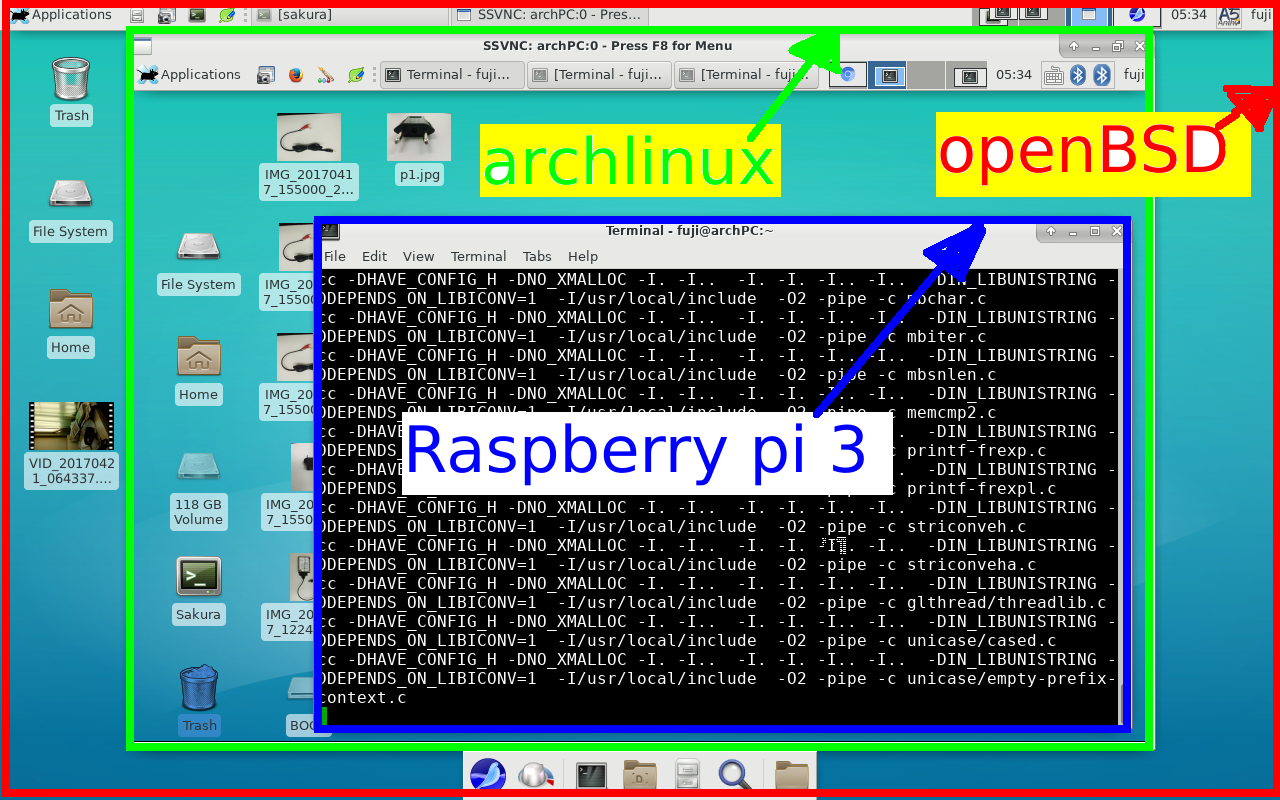
5-1 ) ssh -l userX 192.168.1.83
(from openBSD note PC on bed to archLINUX desktop PC on 1st floor )
5-2 ) then x11vnc
5-3) at new terminal
ssh 192.168.1.83 -L 5900:localhost:5900
5-4)at another new terminal
vncviewer localhost:5900
8)pkg_add nginx
nginx-1.10.2p2: ok
The following new rcscripts were installed: /etc/rc.d/nginx
See rcctl(8) for details.
Look in /usr/local/share/doc/pkg-readmes for extra documentation.
9) backup=cloning sd1->sd2
dd if=/dev/rsd0c of=/dev/rsd2c
(after some time , perhaps 10 min or so)
ctrl + c
newfs sd2a
mount /dev/sd1a /ma1
mount /dev/sd2a /ma2
rsync -avHx /ma1/ /ma2/
mount /dev/sd1i /mi1
mount /dev/sd2i /mi2
rsync -avHx /mi1/ /mi2/
swapctl -a /dev/sd2b
10) wifi router
many PC ---(wifi)--->rum0:raspberry:smsc0---(wired LAN)--->internet
# ./comment-out.bat /etc/hostname.smsc0
dhcp
# ./comment-out.bat /etc/hostname.rum0
awk: can't open file /etc/hostname.rum0
source line number 1
# ./comment-out.bat /etc/rc.conf.local
dhcpd_flags=
pf=YES # Packet filter / NAT
# ./comment-out.bat /etc/sysctl.conf
net.inet.ip.forwarding=1
#/comment-out.bat /etc/dhcpd.interfaces <
rum0
# ./comment-out.bat /etc/dhcpd.conf
option domain-name-servers 8.8.8.8;
subnet 192.168.120.0 netmask 255.255.255.0 {
option routers 192.168.120.1;
range 192.168.120.11 192.168.120.15;
}
# ./comment-out.bat /etc/pf.conf
ext=smsc0
icmp_types = "{echoreq, unreach}"
set block-policy return
set loginterface $ext
set skip on lo0
match in all scrub (no-df max-mss 1440)
match out on $ext inet from !($ext:network) to any nat-to ($ext:0)
block log all
pass out quick
pass in quick inet proto { tcp udp gre } from any to any
pass in quick inet proto icmp all icmp-type $icmp_types keep state
# ./comment-out.bat wifi-AP.bat
sh /etc/netstart
pfctl -f /etc/pf.conf
pfctl -sr
ifconfig rum0 inet 192.168.120.1 netmask 255.255.255.0 \
media autoselect mediaopt hostap nwid openbsdAP wpakey 1234567890 \
chan 1 up
/etc/rc.d/dhcpd restart
continued - see ->
http://openbsd-akita.blogspot.jp/2017/05/arm-server.html

sshd server + www server + wifi router
freeBSDをためす。
http://www.raspbsd.org/raspberrypi.html
にて
root@rpi3:~ # df
Filesystem 1K-blocks Used Avail Capacity Mounted on
/dev/mmcsd0s2a 15161308 1037444 12910960 7% /
devfs 1 1 0 100% /dev
/dev/mmcsd0s1 51128 7620 43508 15% /boot/efi
/dev/md0 29340 24 26972 0% /tmp
/dev/md1 14492 64 13272 0% /var/log
/dev/md2 11420 8 10500 0% /var/tmp
そして rebootすれば HDMIを通じて TV画面に
login:
がでてきます。
しかし このあと FreeBSDしらないので何もできません
<ーーー end ーーー>


