2015年10月15日木曜日

★★★ openbsd 6.1 UEFI

https://en.wikipedia.org/wiki/Treaty_of_Shimonoseki より


  • Article 1: China recognizes definitively the full and complete independence and autonomy of Korea, and, in consequence,
    the
    payment of 
    tribute and the performance of ceremonies and formalities by Korea to China,
    that are in 
    derogation of such independence and autonomy, shall wholly cease for the future.


1) set  legacy on BIOS

2)boot PC by CD (burned with install61.iso)

3)boot PC by USB memory (install61.fs を ddで焼いたもの)


in this state , in put !


and then next command

y


exit


y
なれてる人は ここで G だが 、 初心者は a  


次の 画面のcommand


finish all the install process.
so halt -p & remove CD


on X


UEFI のみの時
dd if=./Downloads/install61.fs  of=/dev/sdb

こうして作ったUSBメモリをCDの代わりに使うが、あとは 一緒

これにて
# df
Filesystem  512-blocks      Used     Avail Capacity  Mounted on
/dev/sd0a    111231348   5741536  99928248     5%    /


# mount /dev/sd0i /mnt


# df
Filesystem  512-blocks      Used     Avail Capacity  Mounted on
/dev/sd0a    111231348   5741536  99928248     5%    /
/dev/sd0i          920       488       432    53%    /mnt


# du /mnt
480     /mnt/efi/boot
488     /mnt/efi
520     /mnt

# ls /mnt/                                                                                          
efi

# ls /mnt/efi/                                                                                      
boot

# ls /mnt/efi/boot/                                                                                 
bootia32.efi  bootx64.efi


# file /mnt/efi/boot/bootx64.efi

/mnt/efi/boot/bootx64.efi: MS-DOS executable PE  for MS Windows


Filesystem  512-blocks      Used     Avail Capacity  Mounted on
/dev/sd0a    111231348   1213112 104456672     1%    /


#top
load averages:  1.07,  1.13,  1.15                                      Uob.my.domain 20:20:23
31 processes: 30 idle, 1 on processor                                                 up  0:55
CPU0 states:  0.0% user,  0.0% nice,  0.0% system,  0.0% interrupt,  100% idle
CPU1 states:  0.0% user,  0.0% nice,  0.0% system,  0.0% interrupt, 99.9% idle
CPU2 states:  0.0% user,  0.0% nice,  0.0% system,  0.0% interrupt,  100% idle
CPU3 states:  0.0% user,  0.0% nice,  0.0% system,  0.0% interrupt, 99.9% idle
Memory: Real: 22M/136M act/tot Free: 7691M Cache: 62M Swap: 0K/2055M


# disklabel -E sd0                                                                            
Label editor (enter '?' for help at any prompt)
> p
OpenBSD area: 1024-117231345; size: 117230321; free: 43
#                size           offset  fstype [fsize bsize   cpg]
  a:        113022272          4209056  4.2BSD   2048 16384 12958 # /
  b:          4208006             1024    swap                    # none
  c:        117231408                0  unused                    
  i:              960               64   MSDOS    


see also

http://marc.info/?l=openbsd-misc&m=144477058232343&w=2


0) BIOS-> legacy boot

1) boot PC by  CD.

2) install but Partway

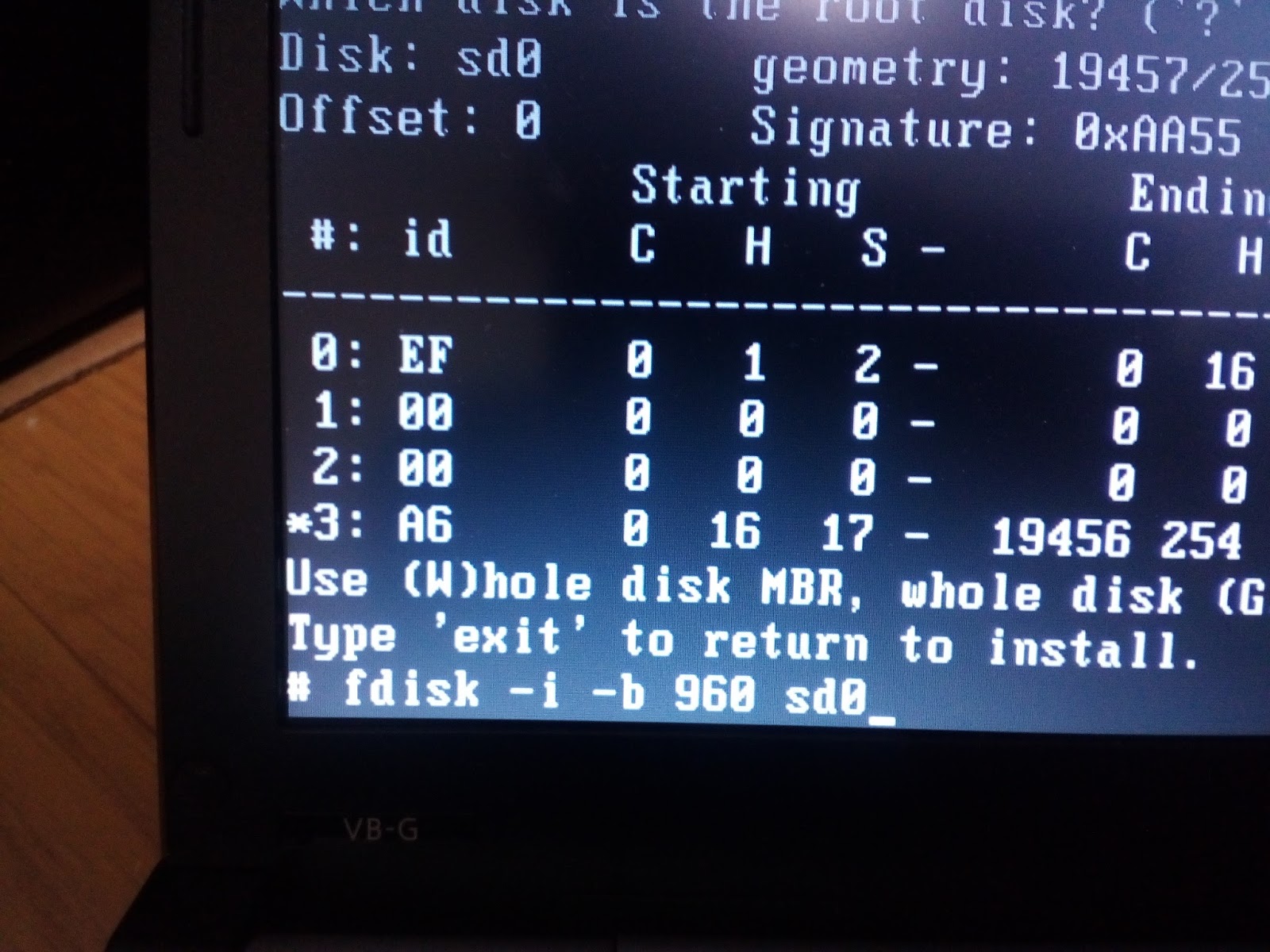
3) when 'Use (W)hole disk .....' appear , push ! and go to shell .

4) fdisk -i -b 960 sd0

5) exit

6) when # appear ,

newfs_msdos sd0i

mount /dev/sd0i  /mnt2

mkdir -p /mnt2/efi/boot

cp /mnt/usr/mdec/BOO* /mnt2/efi/boot


UEFI openbsd rEFInd


openbsd lives in sd1 (2GB USB stick memory)
and
in bios , boot order is usb -> harddisk . 

my pc has mint-linux in hard disk .
so ubuntu automatically apear.

openbsd logo mark is on.
happy for openbsd fellows


on linux


du EFI/
240    EFI/BOOT/OLD
312    EFI/BOOT/drivers_x64
56     EFI/BOOT/tools_x64
800    EFI/BOOT/icons
1776   EFI/BOOT
1784   EFI/


/dev/sdc1         524008      1784    522224   1% /mnt/sdc1
(USB is /dev/sdc)


file EFI/BOOT/bootx64-openbsd.efi
EFI/BOOT/bootx64-openbsd.efi: PE32+ executable (EFI application) x86-64 (stripped to external PDB), for MS Windows


 /root/comment-out.bat EFI/BOOT/refind.conf 
timeout 20
menuentry Linux {
 icon EFI/refind/icons/os_linux.png
 volume KERNELS
 loader bzImage-3.3.0-rc7
 initrd initrd-3.3.0.img
 options "ro root=UUID=5f96cafa-e0a7-4057-b18f-fa709db5b837"
 disabled
}
menuentry Ubuntu {
 loader /EFI/ubuntu/grubx64.efi
 icon /EFI/refined/icons/os_linux.png
 disabled
}
menuentry "ELILO" {
 loader \EFI\elilo\elilo.efi
 disabled
}
menuentry "Windows 7" {
 loader \EFI\Microsoft\Boot\bootmgfw.efi
 disabled
}
menuentry "Windows via shell script" {
 icon \EFI\refind\icons\os_win.png
 loader \EFI\tools\shell.efi
 options "fs0:\EFI\tools\launch_windows.nsh"
 disabled
}
menuentry "My Mac OS X" {
 icon \EFI\refind\icons\os_mac.png
 volume "OS X boot"
 loader \System\Library\CoreServices\boot.efi
 disabled
}
menuentry "OpenBSD/amd64 snapshots58" {
    loader \EFI\Boot\bootx64-openbsd.efi
    icon \EFI\Boot\icons\os_openbsd.png
}


---------------------------------
ls -l  EFI/BOOT/
total 392
drwxr-xr-x 2 root root   8192 10月 14 23:45 OLD
-rwxr-xr-x 1 root root 120832 10月 14 23:54 bootx64-openbsd.efi
-rwxr-xr-x 1 root root 201416  7月  6  2014 bootx64.efi
drwxr-xr-x 2 root root   8192  7月  6  2014 drivers_x64
drwxr-xr-x 2 root root   8192  7月  6  2014 icons
-rwxr-xr-x 1 root root  15477 10月 14 23:52 os_openbsd.png
-rwxr-xr-x 1 root root  21822 10月 14 23:55 refind.conf
drwxr-xr-x 2 root root   8192  7月  6  2014 tools_x64

i think blue bold letters is necessary.
 
some of the others is also  necessary.
trial reveal it .


http://openbsd-akita.blogspot.jp/2015/10/openbsd-uefi_15.html
is the easy method to install to hard disk . 


https://www.youtube.com/watch?v=bqmWOSV--mE&spfreload=10


Korean soldier when the Vietnam War was added to the sexual assault 
against Vietnamese women .
But there is no apology from South Korea to Vietnam for this thing.
 https://en.wikipedia.org/wiki/Phong_Nh%E1%BB%8B_and_Phong_Nh%E1%BA%A5t_massacre


https://www.youtube.com/watch?v=2oLmlYSJEy0
The term Lai Dai Han is a Vietnamese term for a mixed ancestry person 
born to a South Korean father 
and 
a Vietnamese mother (including the victims of Korean soldiers) 
during the Vietnam War. 
 
 Lai Dai Han often live at the margins of Vietnamese society. 
The South Korean government has not released an official statement 
regarding the sexual violence that took place during the Vietnam W
ar.


2015年10月14日水曜日

openbsd & UEFI


install openbsd into  USB harddisk . 


1) boot linux  fdisk /dev/sdb

fdisk -l /dev/sdb
Device     Boot   Start     End Sectors  Size Id Type
/dev/sdb1          2048 1050623 1048576  512M  b W95 FAT32 <-----
/dev/sdb4       1050624 3915775 2865152  1.4G a6 OpenBSD

mkfs.vfat /dev/sdb1 <----


2)boot PC by openbsd CD op  install58(amd64 snapshots)
install openbsd by ordinal procedure .

when [make dev] ends , # appers .

then
mount /dev/sd1i /mnt2
mkdir -p /mnt2/efi/boot
cp /mnt/usr/mdec/BOOT* /mnt2/efi/boot


boot by CD


very important process 
mount /dev/sda1 /mnt2--->needless command, only my mis-typing


power on PC , and push F1 
set EFI


UEFI boot, look display


nomarl openbsd boot state


http://openbsd-akita.blogspot.jp/2015/10/openbsd-uefi_15.html
is the easy method to install to hard disk . 


https://www.youtube.com/watch?v=bqmWOSV--mE&spfreload=10


Korean soldier when the Vietnam War was added to the sexual assault 
against Vietnamese women .
But there is no apology from South Korea to Vietnam for this thing.
https://en.wikipedia.org/wiki/Phong_Nh%E1%BB%8B_and_Phong_Nh%E1%BA%A5t_massacre
 
 
https://www.youtube.com/watch?v=2oLmlYSJEy0
The term Lai Dai Han is a Vietnamese term for a mixed ancestry person 
born to a South Korean father 
and 
a Vietnamese mother (including the victims of Korean soldiers) 
during the Vietnam War. 
 
 Lai Dai Han often live at the margins of Vietnamese society. 
The South Korean government has not released an official statement 
regarding the sexual violence that took place during the Vietnam War.


2015年10月3日土曜日

bridge 1)3枚のNIC+dfhcp+pf

1)まずは


internet
|
run0
openbsd
fxp0 fxp1 em0

と openbsd に


一枚のwifi:  run0
三枚のNIC: fxp0 fxp1 em0
の場合です。


$ cat /etc/hostname.fxp0                                                      
up


$ cat /etc/hostname.fxp1
up


$ cat /etc/hostname.em0                                                       
up


して

# cat /etc/hostname.vether0                                                   
inet 192.168.1.1 255.255.255.0 192.168.1.255
up


して


# cat /etc/hostname.bridge0                                                   
add vether0
add fxp0
add fxp1
add em0
up

します。


すると DHCPDサーバーは


$ cat /etc/dhcpd.interface                                                    
vether0


$ cat /etc/dhcpd.conf                                                         
  option  domain-name-servers 8.8.8.8;

  subnet 192.168.1.0 netmask 255.255.255.0 {
        option routers 192.168.1.1;
        filename "pxelinux.0";     
        range 192.168.1.32 192.168.1.127;
        }


pfつまりfirewallは


# cat /etc/pf.conf

    ext_if="run0"
    int_if="vether0"

tcp_services="{ 22, 80, 143, 587 }"  # submisson port
icmp_types="echoreq"
set block-policy return
set loginterface $ext_if
set skip on lo
match out on $ext_if inet from !($ext_if:network) to any nat-to ($ext_if:0)
set reassemble yes no-df
block in log
pass out quick
antispoof quick for { lo $int_if }
pass in  on  $ext_if   inet proto tcp from any to  ( $ext_if:0 ) port $tcp_services
pass in inet proto icmp all icmp-type $icmp_types
pass in on $int_if


です。


以上にて ifconfigは 以下です -a                                                                                                          
lo0: flags=8049<UP,LOOPBACK,RUNNING,MULTICAST> mtu 32768
        priority: 0
        groups: lo
        inet6 fe80::1%lo0 prefixlen 64 scopeid 0x5
        inet6 ::1 prefixlen 128
        inet 127.0.0.1 netmask 0xff000000


em0: flags=8b43<UP,BROADCAST,RUNNING,PROMISC,ALLMULTI,SIMPLEX,MULTICAST> mtu 1500
        lladdr 00:e0:81:2a:bd:0f
        priority: 0
        media: Ethernet autoselect (none)
        status: no carrier
fxp0: flags=8b43<UP,BROADCAST,RUNNING,PROMISC,ALLMULTI,SIMPLEX,MULTICAST> mtu 1500
        lladdr 00:a0:c9:6d:3f:83
        priority: 0
        media: Ethernet autoselect (100baseTX full-duplex)
        status: active
fxp1: flags=8b43<UP,BROADCAST,RUNNING,PROMISC,ALLMULTI,SIMPLEX,MULTICAST> mtu 1500
        lladdr 00:a0:c9:27:dc:91
        priority: 0
        media: Ethernet autoselect (none)
        status: no carrier


enc0: flags=0<>
        priority: 0
        groups: enc
        status: active

run0: flags=8843<UP,BROADCAST,RUNNING,SIMPLEX,MULTICAST> mtu 1500
        lladdr dc:fb:02:58:a7:cd
        priority: 4
        groups: wlan egress
        media: IEEE802.11 autoselect (DS1 mode 11g)
        status: active
        ieee80211: nwid URoad-662EA0 chan 2 bssid 00:1d:93:66:2e:a0 41dBm wpakey 0x80d48807c087a4cacbbc320ae43060ea4968c557eb3617f79938b64814467a82 wpaprotos wpa1,wpa2 wpaakms psk wpaciphers tkip,ccmp wpagroupcipher tkip
        inet 192.168.100.101 netmask 0xffffff00 broadcast 192.168.100.255


vether0: flags=8943<UP,BROADCAST,RUNNING,PROMISC,SIMPLEX,MULTICAST> mtu 1500
        lladdr fe:e1:ba:d0:49:8f
        priority: 0
        groups: vether
        media: Ethernet autoselect
        status: active
        inet 192.168.1.1 netmask 0xffffff00 broadcast 192.168.1.255


bridge0: flags=41<UP,RUNNING>
        groups: bridge
        priority 32768 hellotime 2 fwddelay 15 maxage 20 holdcnt 6 proto rstp
        vether0 flags=3<LEARNING,DISCOVER>
                port 7 ifpriority 0 ifcost 0
        fxp0 flags=3<LEARNING,DISCOVER>
                port 2 ifpriority 0 ifcost 0
        fxp1 flags=3<LEARNING,DISCOVER>
                port 3 ifpriority 0 ifcost 0
        em0 flags=3<LEARNING,DISCOVER>
                port 1 ifpriority 0 ifcost 0


pflog0: flags=141<UP,RUNNING,PROMISC> mtu 33144
        priority: 0
        groups: pflog

2015年8月24日月曜日

無線を有線に変換 (TVをインターネットにつなげる) NAT

(TV)
nic
|
fxp0
(libretto:OpenBSD)
rum0
|
 電波
|
wifi router
というふうに お蔵入りしているlibrettoを仲介して
TVをインターネットにつなげます。


0)余分なこと(openbsd の pxe install)
/tftp
bsd.rd
pxeboot
etc

cat etc/boot.conf
boot tftp:/bsd.rd


1)まず予備実験です。

(hp PC)
nic
|
HUB
|
fxp0
(libretto:OpenBSD)
rum0
|
wireless
|
(fon)
nic
|
nic
router

openbsd

./comment-out.bat /etc/hostname.fxp0                                                      
inet 192.168.200.1 255.255.255.0


 ./comment-out.bat /etc/hostname.rum0 
nwid MyPlace
wpakey 702446
dhcp


# ./comment-out.bat/etc/dhcpd.interfaces                                                         
fxp0


# ./comment-out.bat /etc/dhcpd.conf                                                               
option domain-name-servers 8.8.8.8;
subnet 192.168.200.0 netmask 255.255.255.0 {
    option routers 192.168.200.1;
    range 192.168.200.200  192.168.200.209;
}


# ./comment-out.bat tv.bat                                                                        
/home/tuyosi/wifi.bat  <ーー>代わりに sh /etc/netstart でもいいかも
ifconfig -a| grep 192
echo 'dhcpd------------'
/etc/rc.d/dhcpd -f restart
cp /etc/resolv.conf-127 /etc/resolv.conf
echo 'unbound----------'
/etc/rc.d/unbound -f restart
sysctl net.inet.ip.forwarding=1
pfctl -f /etc/pf.tv
pfctl -sr
ping -c 3 www.google.com


 ./comment-out.bat wifi.bat                                                                      
ifconfig   rum0 down
ifconfig   rum0 nwid "MyPlace" wpakey "70846" up
dhclient rum0


2)本格運用
予備実験との大きな差は DNS つまり unbound を動かさないといけません。

(TV)
nic
|
fxp0
(libretto:OpenBSD)
rum0
|
 電波
|
wifi router

1)dhcp サーバー
 ./comment-out.bat /etc/hostname.fxp0                                                                                      
inet 192.168.12.1 255.255.255.0


 # ./comment-out.bat /etc/dhcpd.interfaces                                                                                    fxp0


# ./comment-out.bat /etc/dhcpd.conf                                                                                        
option  domain-name-servers 8.8.8.8;
subnet 192.168.12.0 netmask 255.255.255.0 {
        option routers 192.168.12.1;
filename "pxelinux.0";
        range 192.168.12.10 192.168.12.15;
}


2)unbound
#  ./comment-out.bat /etc/resolv.conf
nameserver 127.0.0.1


#  ./comment-out.bat /var/unbound/etc/unbound.conf                                                                          
server:
        interface: 127.0.0.1
        interface: ::1
        access-control: 0.0.0.0/0 refuse
        access-control: 127.0.0.0/8 allow
        access-control: ::0/0 refuse
        access-control: ::1 allow
        hide-identity: yes
        hide-version: yes
        interface: 192.168.12.1
        access-control: 192.168.12.0/24 allow
        local-zone: "home." static
        local-data: "server.home.  IN A 192.168.12.1"
        local-data: "kerai.home. IN A 192.168.12.50"
        local-data-ptr: "192.168.12.1   server.home."
        local-data-ptr: "192.168.12.10   kerai10.home."
        local-data-ptr: "192.168.12.11   kerai11.home."
local-data: "home. IN MX 10 server.home."
local-data-ptr: "192.168.12.1   server.home."


3)シェルスクリプトなど
# ./comment-out.bat /home/tuyosi/wifi.bat-rum0                                                                              
ifconfig rum0 down
ifconfig rum0 nwid "URoad-662EA0" wpakey "04271" up
dhclient rum0


でrum0を wifi routerにつなげます・


# ./comment-out.bat /etc/resolv.conf-127      

nameserver 127.0.0.1

これは unboundを動かすためです。


# ./comment-out.bat /etc/pf.tv-rum0     
ext_if="rum0"
int_if="fxp0"
match out on $ext_if inet from ($int_if:network) to any nat-to ($ext_if:0)
pass in   on $int_if
pass out  on $int_if
pass in   on $ext_if
pass out  on $ext_if


 ./comment-out.bat tv.bat                                                                                                  
/etc/rc.d/syslogd stop
/etc/rc.d/pflogd  stop
/etc/rc.d/smtpd   stop
/etc/rc.d/sndiod  stop
/etc/rc.d/cron    stop
 

/home/tuyosi/wifi.bat-rum0

cp /etc/resolv.conf-127 /etc/resolv.conf
echo 'unbound----------'
/etc/rc.d/unbound -f restart
 

sysctl net.inet.ip.forwarding=1
pfctl -f /etc/pf.tv-rum0


で起動します。


2015年5月27日水曜日

simple mail server ( postfix & dovecot )


how to buid mail server
                using postfix and dovecot 

thanks for
       Thomas Bohl ,Edgar Pettijohn, Edgar Pettijoh, Craig Skinner.
if there is not their helps , i cannot achieve this . 


internet
|
wifi router
192.168.100.254
|
run0 192.168.100.101
openbsd PC1 mailserver  which also runs dnsmasq
bge0 192.168.11.1
|
fxp0
openbsd PC2


pkg_add  postfix-2.11.4     dovecot-2.2.15p0


A) about wifi router
port forward
システム上の仮想サーバ
No. IPアドレス ポート範囲 プロトコル ステータス
1192.168.100.101 22 - 22 TCP&UDP 有効 (effective)
2192.168.100.101 80 - 80 TCP&UDP 有効  (effective)
3192.168.100.101 143 - 143 TCP&UDP 有効  (effective)
4192.168.100.101 587 - 587 TCP&UDP 有効  (effectibv)
5192.168.100.101 993 - 993 TCP&UDP 有効 (effective)


B) about PC1

real name is not a.mydns.jp but ao????? .mydns.jp.

1)
/etc/myname                                                             
------------------
a.mydns.jp


/etc/hosts
-------------
127.0.0.1             localhost
::1                        localhost
192.168.100.101 a.mydns.jp


 /etc/resolv.conf
---------------------                                                                
nameserver 192.168.100.254   #<-192.168.100.254 do internet dns server
lookup file bind


/etc/dnsmasq.conf       : consists dhcpd server of intranet                                                   
---------------------------
listen-address=192.168.11.1    # Example IP
interface=bge0
dhcp-range=192.168.11.10,192.168.11.12,12h
bind-interfaces


 /etc/dovecot/dovecot.conf                                                   
---------------------
protocols = imap
listen = *
!include conf.d/*.conf


  /etc/dovecot/conf.d/10-mail.conf
---------------------------------------------                                         
mail_location = maildir:~/Maildir
namespace inbox {
  inbox = yes
}
mmap_disable = yes
first_valid_uid = 1000
mail_plugin_dir = /usr/local/lib/dovecot
mbox_write_locks = fcntl


2) /etc/dovecot/conf.d/10-ssl.conf
------------------------------------------------                                               
ssl = yes
ssl_cert = </etc/ssl/dovecotcert.pem
ssl_key = </etc/ssl/private/dovecot.pem


to deal with dovecot fails with too many open files
http://comments.gmane.org/gmane.os.openbsd.misc/207288

 /etc/login.conf
 ------------------------------------------
auth-defaults:auth=passwd,skey:
auth-ftp-defaults:auth-ftp=passwd:
default:\
        :path=/usr/bin /bin /usr/sbin /sbin /usr/X11R6/bin /usr/local/bin /usr/local/sbin:\
        :umask=022:\
        :datasize-max=512M:\
        :datasize-cur=512M:\
        :maxproc-max=256:\
        :maxproc-cur=128:\
        :openfiles-cur=512:\
        :stacksize-cur=4M:\
        :localcipher=blowfish,8:\
        :ypcipher=old:\
        :tc=auth-defaults:\
        :tc=auth-ftp-defaults:
daemon:\
        :ignorenologin:\
        :datasize=infinity:\
        :maxproc=infinity:\
        :openfiles-cur=128:\
        :stacksize-cur=8M:\
        :localcipher=blowfish,9:\
        :tc=default:
staff:\
        :datasize-cur=512M:\
        :datasize-max=infinity:\
        :maxproc-max=512:\
        :maxproc-cur=128:\
        :ignorenologin:\
        :requirehome@:\
        :tc=default:
authpf:\
        :welcome=/etc/motd.authpf:\
        :shell=/usr/sbin/authpf:\
        :tc=default:
bgpd:\
        :openfiles-cur=512:\
        :tc=daemon:
unbound:\
        :openfiles-cur=512:\
        :tc=daemon:
dovecot:\
        :openfiles-cur=2048:\
        :openfiles-max=4096:\
        :tc=daemon:


my address is not fixed address ,so i meet
Outbound port 25 Blocking problem.

namely my wifi router (= provider 、not dynamic dns )  prohibits 
               port 25 forwarding .  so  i cannot use relay ,so can't send mail to X@google.com)


but with this limit . i will write how to solve it .

and i receive verous report(for example , crontave ) via mail ,so it is convinient .

X-1)   dynamic dns' mx problem

see http://www.mhserv.info/co5/mydns.php

domain -> a.mydns.jp
mx-------->a.mydns.jp
*            A


X-3)

/etc/pf.conf   
---------------------
ext_if="run0"
int_if="bge0"
tcp_services="{ 22, 80, 143, 587 }"  # submisson port
icmp_types="echoreq"
set block-policy return
set loginterface $ext_if
set skip on lo
match out on $ext_if inet from ($int_if:network) to any nat-to
($ext_if:0)
set reassemble yes no-df
block in log
pass out quick
antispoof quick for { lo $int_if }
pass in  on  $ext_if   inet proto tcp from any to  ( $ext_if:0 ) port 
$tcp_services
pass in inet proto icmp all icmp-type $icmp_types
pass in on $int_if


X4)
follow http://vine.1-max.net/postfix-OP25B.html


namely
/etc/postfix/main.cf
--------------------------------                                                              
myhostname = a.mydns.jp
mydomain = mydns.jp
myorigin = $myhostname
inet_interfaces = all
mydestination = $myhostname localhost.$mydomain
home_mailbox = Maildir/
mynetworks = 192.168.100.0/24, 127.0.0.0/8
queue_directory = /var/spool/postfix
command_directory = /usr/local/sbin
daemon_directory = /usr/local/libexec/postfix
data_directory = /var/postfix
mail_owner = _postfix
inet_protocols = all
unknown_local_recipient_reject_code = 550
debug_peer_level = 2
debugger_command =
         PATH=/bin:/usr/bin:/usr/local/bin:/usr/X11R6/bin
         ddd $daemon_directory/$process_name $process_id & sleep 5
sendmail_path = /usr/local/sbin/sendmail
newaliases_path = /usr/local/sbin/newaliases
mailq_path = /usr/local/sbin/mailq
setgid_group = _postdrop
html_directory = /usr/local/share/doc/postfix/html
manpage_directory = /usr/local/man
sample_directory = /etc/postfix
readme_directory = /usr/local/share/doc/postfix/readme
relayhost = [smtp.gmobb.jp]:587  <-regretably relay ,so use personally
smtp_sasl_auth_enable = yes
smtp_sasl_password_maps = hash:/etc/postfix/isp_auth
smtp_sasl_security_options = noanonymous


X-5) /etc/postfix/isp_auth
---------------------                                                             
[smtp.gmobb.jp]:587 t?????@ki.gmobb.jp:S?????

and
postmap /etc/postfix/isp_auth


X-6)

/etc/postfix/master.cf                                                            
--------------------------
smtp      inet  n       -       -       -       -       smtpd
submission inet n       -       -       -       -       smtpd
pickup    unix  n       -       -       60      1       pickup
cleanup   unix  n       -       -       -       0       cleanup
qmgr      unix  n       -       -       300     1       qmgr
tlsmgr    unix  -       -       -       1000?   1       tlsmgr
rewrite   unix  -       -       -       -       -       trivial-rewrite
bounce    unix  -       -       -       -       0       bounce
defer     unix  -       -       -       -       0       bounce
trace     unix  -       -       -       -       0       bounce
verify    unix  -       -       -       -       1       verify
flush     unix  n       -       -       1000?   0       flush
proxymap  unix  -       -       n       -       -       proxymap
proxywrite unix -       -       n       -       1       proxymap
smtp      unix  -       -       -       -       -       smtp
relay     unix  -       -       -       -       -       smtp
showq     unix  n       -       -       -       -       showq
error     unix  -       -       -       -       -       error
retry     unix  -       -       -       -       -       error
discard   unix  -       -       -       -       -       discard
local     unix  -       n       n       -       -       local
virtual   unix  -       n       n       -       -       virtual
lmtp      unix  -       -       -       -       -       lmtp
anvil     unix  -       -       -       -       1       anvil
scache    unix  -       -       -       -       1       scache


then do script

mail-server.bat                                                             
/etc/rc.d/dnsmasq  restart
/etc/rc.d/dovecot  restart
/etc/rc.d/postfix  restart


to make coment out ,
commentout.bat                                                                                            
awk '$1 !~ "#"{print}' $1 | awk 'NF >0 {print}' -